
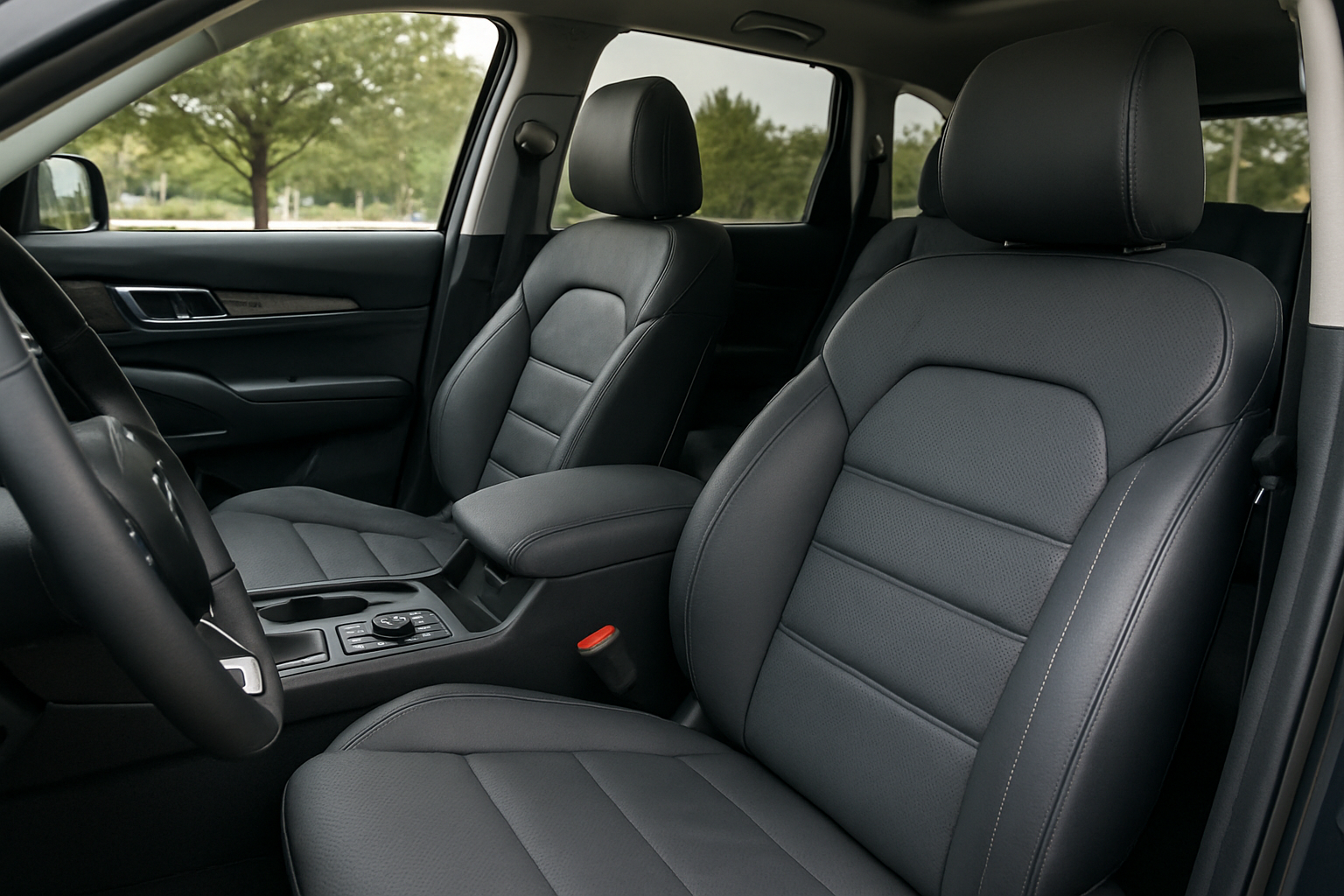
The Kia Telluride’s ventilated and heated seats transform your driving experience, keeping you comfortable in any weather. These premium features work across multiple heat and cooling levels, integrate with your climate system, and can even save your preferences to driver profiles.
Let’s walk through everything you need to know about using these comfort features effectively.
Understanding Your Telluride’s Seat Climate Control System
Your Kia Telluride comes equipped with a sophisticated seat climate control system that goes beyond basic heating. The front seats offer both heating and ventilation, while the second-row seats include heating functionality. The system works through perforated leather that allows air circulation for cooling and embedded heating elements for warmth.
The ventilation system pulls air through the seat perforations using built-in fans, creating a cooling effect that’s particularly effective in hot weather or when you’re wearing heavy clothing. The heating system uses electrical elements woven into the seat cushions and backrests to provide warmth during cold conditions.
Both systems operate independently of your main HVAC system, though they can work together through the auto climate integration feature. This means you can have cool air blowing from the vents while your seat heaters warm your back, or vice versa.
Locating the Seat Climate Controls
The primary seat climate controls sit on the center console between the front seats. You’ll find them positioned below the climate control panel, arranged as two columns of buttons corresponding to the driver and passenger seats.
Each seat has dedicated buttons marked with clear icons. The heated seat buttons show wavy lines with an upward arrow, while the ventilated seat buttons display wavy lines with a downward arrow. The buttons illuminate when activated, with different brightness levels indicating the intensity setting.
For rear passengers, heated seat controls are located on the back of the center console, easily accessible from the second row. These buttons follow the same icon design as the front controls but only offer heating functionality.
Operating the Front Heated Seats
Press the heated seat button once to activate the lowest heat setting. The button will illuminate with one indicator light, and you’ll feel warmth building within 30 to 60 seconds. Continue pressing the button to cycle through the three heat levels, each represented by additional indicator lights.
Level one provides gentle warmth suitable for mildly cool conditions or extended use. Level two offers moderate heating that works well for most cold weather situations. Level three delivers maximum heat output, ideal for extremely cold conditions or when you need to warm up quickly.
The system includes automatic temperature regulation to prevent overheating. After running at level three for approximately 30 minutes, it will automatically step down to level two, then to level one to maintain comfortable temperatures without excessive heat.
To turn off the heated seats, continue pressing the button until all indicator lights turn off. The system also shuts off automatically when you turn off the ignition, though it will remember your last setting when linked to a driver profile.
Using the Ventilated Seats Effectively
The ventilated seats work best when you’re already at a comfortable temperature or slightly warm. Press the ventilation button to activate the lowest fan speed, indicated by one illuminated segment on the button. Like the heated seats, you can cycle through three fan speeds by pressing the button repeatedly.
Level one provides gentle air circulation that’s barely noticeable but effective for maintaining comfort. Level two offers moderate airflow that you’ll definitely feel, perfect for warm weather driving. Level three delivers maximum fan speed, creating strong air circulation that’s ideal for cooling down quickly on hot days.
The ventilation system works by drawing cabin air through the seat perforations. For best results, set your main air conditioning to recirculate mode when using seat ventilation in hot weather. This ensures the coolest possible air flows through the seats.
Avoid using seat ventilation with wet clothing, as the airflow can make damp fabric feel uncomfortably cold. The system works most effectively with breathable fabrics rather than waterproof materials that block air circulation.
Rear Seat Heating Operation
Second-row passengers control their heated seats using buttons mounted on the back of the center console. These controls mirror the front seat operation with the same three-level system and automatic step-down feature.
Rear seat heating takes slightly longer to warm up compared to the front seats, typically requiring 60 to 90 seconds to reach operating temperature. This delay occurs because the rear heating elements are designed for energy efficiency rather than rapid heating.
The rear heated seats operate independently of the front seats and climate control system. Passengers can adjust their comfort level without affecting the front seat occupants or requiring driver intervention.
Remember that rear seat heating only functions when the ignition is on. Unlike some luxury vehicles, the Telluride doesn’t offer remote start activation for rear seat heating.
Heated Steering Wheel Integration
Your Telluride’s heated steering wheel button sits on the left side of the steering wheel controls. The button features a steering wheel icon with wavy heat lines, making it easy to identify by feel while driving.
The heated steering wheel activates with a single press and operates at one temperature level. It reaches operating temperature within 30 to 45 seconds and maintains consistent warmth without manual adjustment.
When linked to driver profiles, the heated steering wheel setting saves along with your seat heating preferences. This integration means your steering wheel can automatically warm up when you start the vehicle, based on your stored preferences.
The heating element covers the entire grip area of the steering wheel, ensuring your hands stay warm regardless of your preferred driving position. The system automatically shuts off after approximately 30 minutes to prevent battery drain and overheating.
Linking Preferences to Driver Profiles
The Telluride allows you to save seat climate preferences to driver memory profiles, making your comfort settings automatic. Access the driver memory controls located on the left side of the driver’s seat or through the infotainment system settings menu.
To save your preferences, adjust your seat heating, ventilation, and steering wheel settings to your desired levels. Press and hold memory button 1 or 2 until you hear a confirmation chime, indicating your settings are stored.
When you select a memory profile using the buttons or key fob, the system automatically activates your saved seat climate settings along with seat position and mirror adjustments. This feature proves particularly valuable in households where multiple drivers use the vehicle.
You can modify saved preferences at any time by adjusting the settings and re-saving to the same memory button. The system overwrites previous settings with your new preferences.
Auto Climate Integration Features
The Telluride’s intelligent climate system can automatically activate seat heating or ventilation based on cabin temperature and exterior conditions. Access these settings through the infotainment system’s climate menu under “Auto Comfort” options.
When auto climate integration is enabled, the system monitors interior temperature and can trigger seat ventilation when the cabin becomes warm or seat heating when temperatures drop. This automation works in conjunction with your main climate control settings.
You can customize the temperature thresholds that trigger automatic seat climate activation. The system typically activates seat heating when interior temperature drops below 65°F and ventilation when it rises above 75°F, but these settings are adjustable.
The auto climate integration respects your driver profile preferences, applying your preferred intensity levels when automatically activating seat climate features. You can still manually override automatic settings at any time using the physical buttons.
Maximizing Comfort and Efficiency
Combine seat heating with lower cabin temperatures to reduce overall energy consumption while maintaining comfort. Running seat heaters at level two with the cabin temperature set to 68°F often feels warmer than setting the cabin to 72°F without seat heating.
During summer months, use seat ventilation with moderate air conditioning settings. The combination allows you to set the main AC to 74°F while staying comfortable, reducing fuel consumption and engine load.
Preheat or precool your seats during remote start sessions. Start your Telluride remotely, then immediately enter and activate your preferred seat settings before driving. This approach ensures comfort from the moment you begin driving.
Layer your clothing appropriately for seat climate systems. Thin, breathable fabrics work best with both heating and ventilation, while thick coats can block heat transfer and reduce effectiveness.
Troubleshooting Common Issues
If your heated seats aren’t warming up, check that you’re pressing the correct button and that the indicator lights are illuminating. Verify that your seat covers or cushions aren’t blocking heat transfer from the leather surface.
Ventilated seats that seem ineffective might be blocked by seat covers or non-breathable clothing. Remove any aftermarket seat covers and ensure you’re wearing breathable fabrics for optimal air circulation.
Intermittent operation often indicates a loose electrical connection under the seat. This repair requires professional service, as it involves working with airbag systems and should not be attempted as a DIY fix.
Settings that don’t save to memory profiles usually indicate the memory function isn’t properly activated or the vehicle’s battery has been disconnected recently, clearing stored settings.
Frequently Asked Questions
Can I use heated and ventilated seats simultaneously?
No, the system prevents simultaneous operation of heating and ventilation on the same seat. The controls are designed to automatically turn off one function when you activate the other, preventing conflicting operations and potential system damage.
Do the seat climate features work with aftermarket seat covers?
Most aftermarket seat covers will significantly reduce the effectiveness of both heating and ventilation systems. If you must use seat covers, choose thin, perforated designs specifically made for vehicles with climate-controlled seats.
How much does using seat climate control affect fuel economy?
Seat heating and ventilation have minimal impact on fuel economy compared to running the main HVAC system at extreme settings. Using seat climate features while moderating cabin temperature settings can actually improve overall efficiency.
Will the seat climate features drain my battery when parked?
The seat climate systems only operate when the ignition is on and automatically shut off when you turn off the engine. They won’t drain your battery when the vehicle is parked and locked.

Leave a Reply