
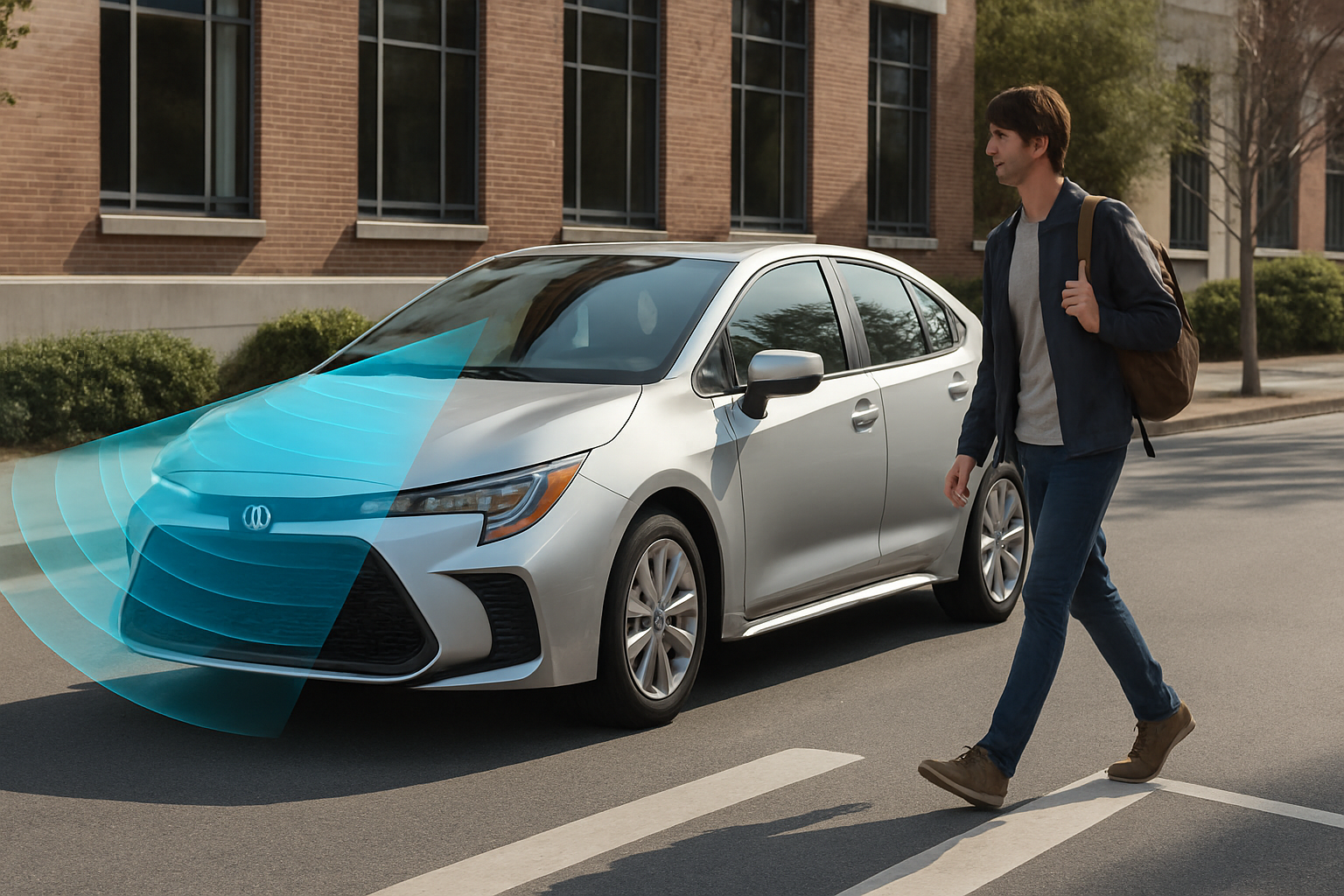
Toyota’s Pre-Collision System (PCS) with Pedestrian Detection has become one of the most valuable safety features available in modern vehicles. This advanced system can literally save lives by automatically applying the brakes when it detects an imminent collision with pedestrians, cyclists, or other vehicles.
Understanding how to properly use and configure this system ensures you get maximum protection while minimizing false alerts that can make driving frustrating.
Understanding Toyota’s Pre-Collision System Technology
The Pre-Collision System uses a combination of cameras and radar sensors mounted behind the grille and near the rearview mirror to constantly scan the road ahead. The system analyzes movement patterns, shapes, and distances to identify potential collision threats.
When the system detects a pedestrian, cyclist, or vehicle in your path, it first provides visual and audible warnings. If you don’t respond quickly enough, the system automatically applies emergency braking to either prevent the collision entirely or reduce impact severity.
The technology works at speeds up to 50 mph for pedestrian detection and up to 112 mph for vehicle detection. Toyota has continuously refined this system across model years, with newer versions offering enhanced sensitivity and broader detection capabilities.
Day and Low-Light Detection Capabilities
Modern Toyota Corolla models excel at pedestrian detection during daylight hours, accurately identifying people crossing streets, walking along roadways, or standing near traffic lanes. The camera system can distinguish between actual pedestrians and objects like trees, signs, or parked vehicles.
Low-light performance has improved significantly in recent model years. The system now works effectively during dusk and dawn conditions, though performance does decrease in complete darkness or heavy rain. Street lighting helps the cameras maintain detection accuracy during nighttime driving.
You’ll notice the system performs best when pedestrians are wearing contrasting clothing against the background. Dark clothing against dark pavement can reduce detection distance, while bright or reflective clothing enhances the system’s ability to identify pedestrians early.
Cyclist Detection Features
The Pre-Collision System recognizes cyclists as distinct from pedestrians, accounting for their faster movement speeds and different shapes. This includes detection of cyclists riding in bike lanes, crossing intersections, or sharing the roadway.
Cyclist detection works most reliably when riders maintain predictable paths. Sudden movements or cyclists weaving between traffic can challenge the system’s ability to accurately predict collision risk. The system accounts for typical bicycle speeds when calculating braking timing.
Mountain bikes, road bikes, and e-bikes all register similarly to the detection system. However, very small children’s bikes or unusual bicycle configurations might not always trigger the same response as standard adult bicycles.
Intersection Support Technology
Intersection support represents one of the most advanced features of Toyota’s system. The technology can detect pedestrians and cyclists entering crosswalks, even when they’re initially outside your direct path but moving toward a collision point.
When making left turns at intersections, the system monitors for oncoming vehicles that might be obscured by other traffic. This predictive capability helps prevent T-bone collisions during turning maneuvers.
The system also recognizes traffic light scenarios, though it doesn’t directly interface with traffic signals. Instead, it monitors the behavior of vehicles and pedestrians to anticipate potential intersection conflicts.
Adjusting Sensitivity Settings
You can customize the Pre-Collision System’s sensitivity through the multi-information display settings menu. Access these controls by pressing the up and down arrows on your steering wheel to navigate through the menu options.
Look for “Vehicle Settings” or “Safety Settings” in the main menu, then select “Pre-Collision System.” You’ll find options for “Early,” “Standard,” and “Late” warning timing. Early warnings provide maximum safety margin but may feel overly cautious for confident drivers.
The collision sensitivity setting affects both the warning timing and the point at which automatic braking engages. Standard settings work well for most drivers and traffic conditions. Consider adjusting to Early if you frequently drive in heavy pedestrian areas or school zones.
You can also adjust the warning volume separately from other vehicle alerts. This helps ensure you’ll hear collision warnings even if you prefer quieter navigation or phone call volumes.
Common False Alert Triggers
Understanding what triggers false alerts helps you anticipate and minimize frustrating interruptions while driving. Sharp curves combined with guardrails or concrete barriers frequently cause false vehicle detection alerts as the system briefly “sees” these objects as collision threats.
Overhead signs, bridge structures, and overpasses can trigger warnings when the system interprets them as obstacles in your path. This happens most often on hills or when approaching structures at angles that confuse the sensors.
Heavy rain, snow, or fog can cause false alerts by obscuring the sensors’ view or creating reflections that appear as objects. Dirty camera lenses produce similar effects, making regular cleaning essential for proper operation.
Construction zones with temporary barriers, cones, or workers moving unpredictably often trigger multiple alerts. While some of these represent legitimate safety concerns, others result from the system’s cautious interpretation of unusual traffic patterns.
Reducing False Alerts
Keep your front camera lens clean by wiping it regularly with a microfiber cloth. The camera location varies by model year but is typically mounted near the rearview mirror behind the windshield.
Check that your windshield isn’t cracked or chipped in the camera’s field of view. Even small damage can distort the camera’s perception and increase false alerts.
Avoid following other vehicles too closely, as this reduces the system’s ability to distinguish between intentional close following and potential collision scenarios. Maintaining proper following distance improves system accuracy.
Maximizing System Effectiveness
Regular maintenance keeps your Pre-Collision System operating at peak performance. Schedule sensor calibration checks during routine maintenance intervals, especially after any front-end body work or windshield replacement.
Learn to recognize the different warning types so you can respond appropriately. Visual warnings appear in your instrument cluster, while audio warnings vary in urgency based on collision risk level. Familiarizing yourself with these signals helps you distinguish between minor alerts and serious warnings.
Practice responding to system warnings in safe environments like empty parking lots. Understanding how the warnings feel and sound helps you react more quickly when real emergencies occur.
Remember that the system works best when you maintain alertness and proper driving techniques. The Pre-Collision System serves as a backup safety net, not a replacement for attentive driving.
System Limitations to Consider
Weather conditions significantly impact system performance. Heavy snow, rain, or fog can temporarily disable pedestrian detection features. You’ll see warning messages in your instrument cluster when weather affects system operation.
Very small children or people using mobility devices may not always register consistently with the detection system. The cameras and radar are calibrated for typical adult pedestrian profiles, so unusual shapes or sizes can sometimes avoid detection.
Speed affects detection range and reaction time. At higher speeds, the system has less time to identify threats and warn you. Urban driving at lower speeds allows the system to work most effectively.
The system cannot detect pedestrians who are completely hidden behind other objects until they enter the sensors’ field of view. This makes careful observation around parked cars and blind corners essential.
Troubleshooting Common Issues
If your Pre-Collision System displays error messages or stops working, start by cleaning all sensor locations. Dirt, ice, or debris blocking the radar or camera sensors will disable the system until removed.
Check for any aftermarket accessories mounted on your front bumper or grille that might interfere with sensor operation. License plate frames, decorative grille covers, or mounting brackets can block sensor signals.
Extreme temperatures sometimes cause temporary system shutdowns. Very hot or cold weather can affect sensor sensitivity until components reach normal operating temperatures.
Persistent error messages usually indicate the need for professional diagnosis. Toyota dealerships have specialized diagnostic equipment to test sensor alignment and system calibration.
Frequently Asked Questions
Can I completely disable the Pre-Collision System?
You can turn off collision warnings through the vehicle settings menu, but automatic emergency braking cannot be completely disabled in most model years. This design ensures some level of collision protection remains active even if you find the warnings annoying.
Does the system work in all weather conditions?
The Pre-Collision System has limitations in severe weather. Heavy snow, rain, or fog can temporarily disable pedestrian detection features. The system typically reactivates automatically when conditions improve and sensors are clean.
How do I know if my sensors need cleaning?
You’ll receive dashboard warning messages when sensors are blocked or dirty. Additionally, if you notice increased false alerts or decreased sensitivity in normal conditions, cleaning the camera and radar sensors often resolves these issues.
Will the system prevent all pedestrian collisions?
While highly effective, the Pre-Collision System cannot prevent every possible collision scenario. The system works best as a supplement to alert, defensive driving rather than a replacement for proper attention and caution around pedestrians.


Leave a Reply