
The Volkswagen Atlas comes packed with advanced driver assistance features that make parking and city driving significantly easier. Two of the most useful technologies you’ll find in your Atlas are the Park Assist system and Auto Hold feature, both designed to take some of the stress out of everyday driving situations.
These features work together with other safety systems like the Electronic Parking Brake and Hill Start Assist to create a comprehensive suite of driving aids. Once you understand how to use them properly, you’ll wonder how you ever managed without them.
Understanding Park Assist in Your Volkswagen Atlas
Park Assist is Volkswagen’s semi-automated parallel parking system that takes the guesswork out of squeezing into tight spaces. The system uses ultrasonic sensors mounted around your Atlas to measure available parking spots and guide you through the parking process.
When you’re driving at speeds below 22 mph, Park Assist automatically scans for parallel parking spaces on both sides of your vehicle. The system can detect spaces that are at least 1.2 times longer than your Atlas, which gives you a decent buffer for maneuvering.
How to Activate Park Assist
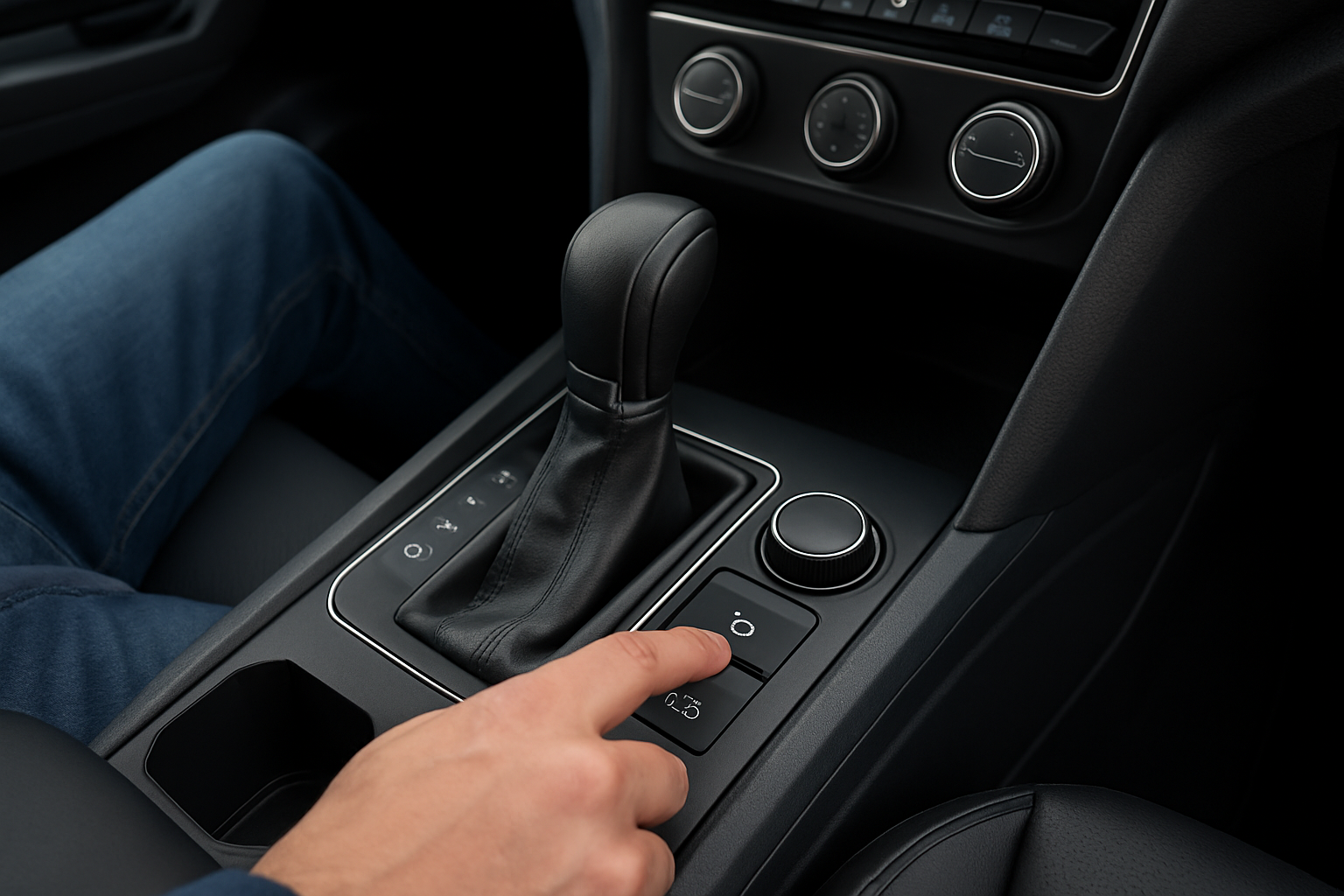
You’ll find the Park Assist button located on the center console, typically near the gear selector. The button features an icon that looks like a car positioned between two vertical lines, representing a parking space.
To use Park Assist, press the button while driving slowly past potential parking spaces. The system will display a “P” symbol on your infotainment screen when it detects a suitable spot. Stop your Atlas when you see this indicator.
The system will then prompt you to shift into reverse. Once you do, Park Assist takes control of the steering wheel while you manage the accelerator and brake pedals. Your Atlas will automatically steer into the parking space while you control the forward and reverse movements.
Park Assist Limitations to Keep in Mind
Park Assist works best in ideal conditions, but it has some limitations you should know about. The system can struggle with angled parking spaces or spots that have unusual obstacles like motorcycles, trailers, or shopping carts.
Weather conditions also affect performance. Heavy rain, snow, or ice can interfere with the ultrasonic sensors, causing the system to provide inaccurate readings or fail to detect spaces altogether.
You can override the system at any time by grabbing the steering wheel or pressing the Park Assist button again. This gives you full control back if you notice the system making a mistake or if you need to abort the parking attempt.
Mastering the Auto Hold Feature
Auto Hold is a convenience feature that automatically applies the brakes when your Atlas comes to a complete stop. This prevents the vehicle from rolling forward or backward when you’re stopped at traffic lights, in stop-and-go traffic, or on inclines.
The feature works by monitoring various sensors including the brake pedal position, wheel speed sensors, and the transmission status. When these inputs indicate your Atlas has stopped intentionally, Auto Hold engages the brakes automatically.
Activating Auto Hold
Look for the Auto Hold button on your center console, which typically displays “AUTO HOLD” text or an (A) symbol with a circle and brake pad icon. Press this button once to activate the system, and you’ll see a confirmation light appear on your dashboard.
Auto Hold requires your seatbelt to be fastened and the driver’s door to be closed before it will function. The system also needs you to come to a complete stop with the brake pedal pressed for it to engage.
Once activated, you’ll see an (A) symbol with “HOLD” displayed on your instrument cluster when the system is actively holding the brakes. You can release the brake pedal at this point, and your Atlas will remain stationary.
Releasing Auto Hold
Getting moving again with Auto Hold engaged is simple. Just press the accelerator pedal gently, and the system automatically releases the brakes as you begin to accelerate. The transition feels smooth and natural once you get used to it.
If you’re on a steep hill, the system works together with Hill Start Assist to prevent any backward rolling when you accelerate from a stop. This coordination between systems provides a seamless driving experience.
You can also manually release Auto Hold by pressing the brake pedal and then releasing it, or by pressing the Auto Hold button again to turn the system off completely.
Electronic Parking Brake Integration
Your Atlas’s Electronic Parking Brake (EPB) works closely with both Park Assist and Auto Hold to provide additional safety and convenience. The EPB automatically engages when you turn off the engine while Auto Hold is active.
You’ll find the EPB switch near the Auto Hold button, marked with a (P) symbol and a brake icon. Pull the switch up to engage the parking brake manually, or push it down to release it when the engine is running.
The EPB also includes an automatic release function. When you fasten your seatbelt, close the door, and begin to accelerate with the transmission in drive, the parking brake releases automatically. This feature works whether you set the parking brake manually or if Auto Hold engaged it when you turned off the engine.
Hill Start Assist in Action
Hill Start Assist complements both Auto Hold and the Electronic Parking Brake when you’re stopped on an incline. This system prevents your Atlas from rolling backward when you release the brake pedal to accelerate on a hill.
The system activates automatically when it detects you’re stopped on a slope greater than 5 degrees. You don’t need to press any buttons or activate Hill Start Assist manually, as it works in the background whenever needed.
When you release the brake pedal on a hill, Hill Start Assist holds the brakes for approximately 2 seconds, giving you time to move your foot to the accelerator and begin driving forward. This prevents the embarrassing and potentially dangerous situation of rolling into the car behind you.
Troubleshooting Common Issues
Sometimes Park Assist might not detect suitable parking spaces even when you can see obvious spots. This often happens when the spaces are too small, irregularly shaped, or blocked by objects the sensors can’t properly identify.
If Auto Hold isn’t working, check that your seatbelt is fastened, the driver’s door is closed, and you’ve come to a complete stop with the brake pedal pressed. The system won’t engage if any of these conditions aren’t met.
Clean your ultrasonic sensors regularly, especially during winter months when salt and grime can accumulate. You’ll find these sensors as small circular units embedded in your front and rear bumpers. A simple rinse with clean water usually keeps them functioning properly.
Getting the Most from These Features
Practice using Park Assist in low-stress situations before relying on it in busy urban areas. Empty parking lots with cones or other cars can provide good practice opportunities to understand how the system behaves.
Auto Hold works particularly well in heavy traffic situations where you’d otherwise be constantly pressing and releasing the brake pedal. The feature reduces leg fatigue and helps you maintain consistent stopping positions.
Remember that these are assistance features, not fully autonomous systems. Stay alert and ready to take control at any time, especially when using Park Assist in tight quarters or around pedestrians.
Frequently Asked Questions
Can I use Park Assist for perpendicular parking?
The Park Assist system in the Volkswagen Atlas is designed specifically for parallel parking situations. It cannot assist with perpendicular parking spaces like those found in most shopping center parking lots. The system’s sensors and software are calibrated for side-by-side parking maneuvers only.
Will Auto Hold drain my battery?
Auto Hold uses minimal electrical power and won’t significantly impact your Atlas’s battery life. The system uses the same brake components as normal braking, just with electronic control instead of your foot pressure. However, if you leave the vehicle running with Auto Hold engaged for extended periods, it will contribute to normal electrical system load.
What happens if I open the door while Auto Hold is active?
Opening the driver’s door while Auto Hold is engaged will cause the Electronic Parking Brake to automatically set. This safety feature prevents the vehicle from moving if you exit while stopped on an incline or if someone else accidentally presses the accelerator.
Can I turn off Hill Start Assist if I don’t want it?
Hill Start Assist operates automatically and doesn’t have a dedicated on/off switch like Auto Hold or Park Assist. The system is designed as a safety feature that works in the background. If you want to disable it, you would need to have it turned off through the vehicle’s programming at a Volkswagen dealership, though this isn’t typically recommended for safety reasons.
Leave a Reply