

If you’ve been driving your Kia Sportage for more than a few weeks, you’ve probably seen it: a small coffee cup icon pops up on the dash, a chime sounds, and a message reading “Consider Taking a Break” appears right in front of you. It usually shows up after a couple hours behind the wheel, sometimes after a few sharp lane corrections in a row. It’s not a malfunction. It’s Kia’s Driver Attention Warning system doing exactly what it was designed to do.
The tricky part is figuring out what you can actually change about it. Some owners want it gone entirely, others just want it less sensitive, and the settings menu doesn’t always make the difference obvious. Here’s how the system actually works on the Sportage, where to find the settings, and what’s realistic to expect from those menus.
How Driver Attention Warning Actually Works

Driver Attention Warning (DAW) on the Sportage doesn’t watch your face or your eyes. It’s not a camera-based system like some newer luxury vehicles use. Instead, it tracks your steering inputs, throttle behavior, and how long you’ve been driving, then compares that pattern against what it considers normal, alert driving.
When it detects erratic corrections, drifting within the lane, or you’ve simply logged a long stretch of driving time, it triggers an audible chime paired with the “Consider Taking a Break” message on the cluster or head-up display. On some trims it will even suggest the nearest rest stop through the navigation system if you have UVO connected.
It’s a similar idea to the rear seat monitoring tech Hyundai uses in the Rear Seat Reminder and Rear Occupant Alert system, just applied to fatigue detection instead of occupancy. Kia and Hyundai share a lot of the same safety architecture, so the logic behind DAW will feel familiar if you’ve owned a Hyundai before.
Where the Setting Lives on Your Sportage
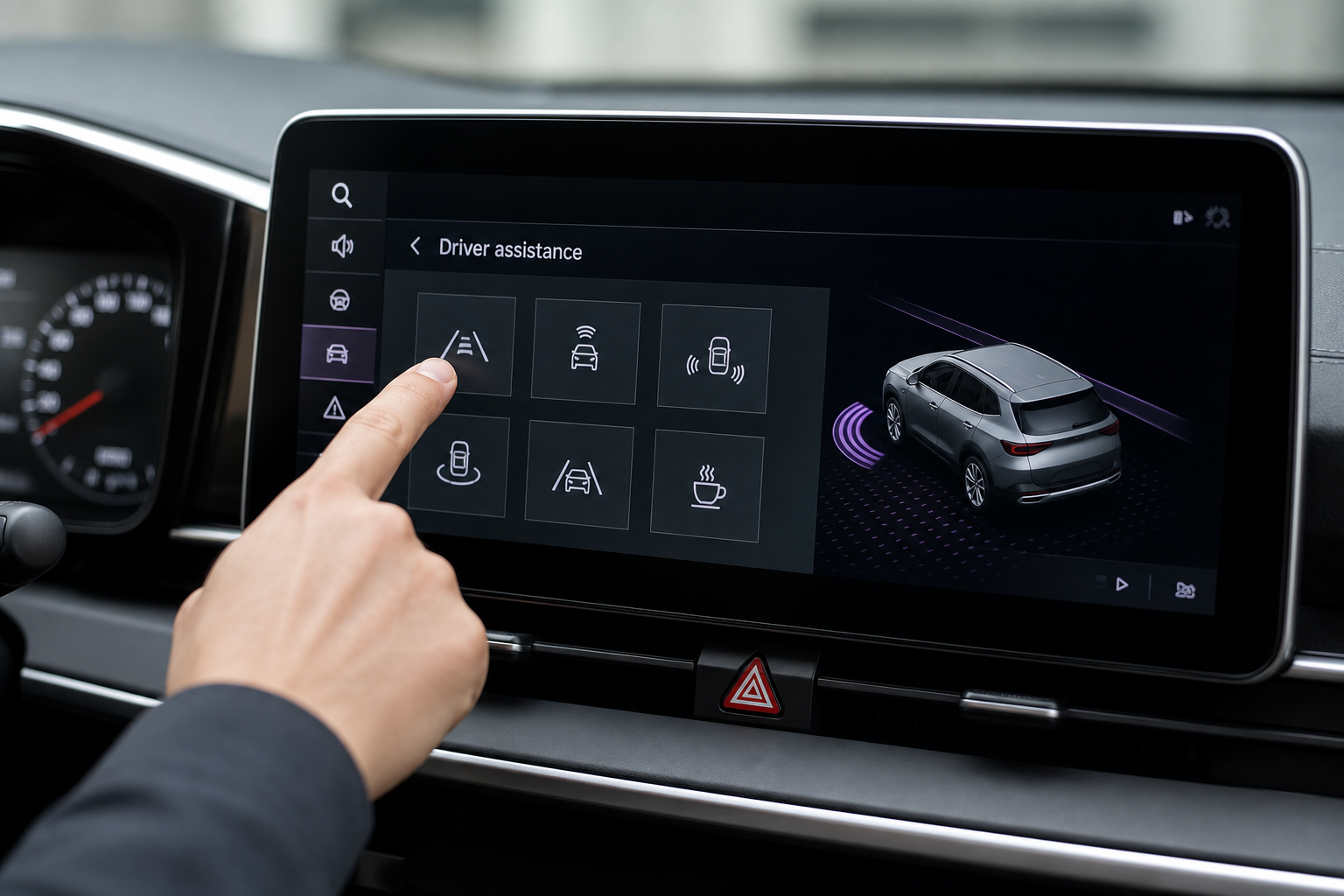
The exact menu path depends on which generation Sportage you own, and Kia has moved things around more than once.
- 2023 and newer (NQ5 generation): Touch the Settings icon on the main screen, then go to Vehicle, then Driver Assistance. Driver Attention Warning shows up as its own line item with a sensitivity slider.
- 2017-2022 Sportage (QL generation): The setting is usually under Settings, then Vehicle Settings, then Driver Convenience or Driver Assist, depending on your infotainment software version.
If you can’t locate it in either spot, check your owner’s manual glovebox card or the digital manual through the UVO app, since Kia occasionally shuffles menu labels with software updates. It’s worth a quick look through the manual anyway, the way you would to confirm reset procedures on something like a Hyundai Tucson’s TPMS light, since Sportage and Tucson share a platform and a lot of menu logic.
What You Can Actually Turn Off

This is where owners get tripped up, because there are three different things happening in that menu and they are not the same.
Temporary mute. When the warning pops up, you can tap the screen or press a button on the steering wheel to dismiss it for that drive. This does nothing long-term. The system resets the next time you start the car.
Sensitivity adjustment. Inside the Driver Attention Warning menu, you’ll typically find a Low, Medium, or High sensitivity option. Dropping it to Low means the system waits longer and needs more erratic input before it triggers the chime. This is the setting most owners actually want, since it cuts down on false alarms without eliminating the feature completely.
Persistent off. Some Sportage model years include an On/Off toggle for the whole feature that holds after you shut the car off and restart it. Other model years and other regions only let the warning be muted per drive cycle, because updated safety regulations in some markets require this kind of monitoring to stay active. Kia has not published a single, universal answer that applies to every Sportage year and trim, so don’t assume a true permanent off exists on your specific vehicle until you’ve confirmed it stays off through a full key cycle.
If you toggle the setting off and it’s still off the next time you start the car, you’ve got a genuine persistent off switch. If it turns back on, you’re only muting it temporarily, and adjusting sensitivity is your best long-term option.
Kia isn’t the only brand walking this line between convenience and safety compliance. Similar restrictions show up with other advanced driver assist systems, like the Pre-Collision System on the Toyota Corolla, where certain functions can be adjusted but not fully disabled depending on the model year.
Frequently Asked Questions
Does adjusting sensitivity affect other driver assist features?
No. Driver Attention Warning sensitivity is a standalone setting on the Sportage. It doesn’t touch Lane Keep Assist, Forward Collision-Avoidance, or Smart Cruise Control. You can turn DAW sensitivity down to Low while leaving every other safety system at full strength.
Why does the warning trigger even on short trips?
If you’re getting the “Consider Taking a Break” message on drives under 30 minutes, the system is likely reading your steering corrections as erratic, not your drive time. This happens often on winding roads or in stop-and-go traffic where you’re making frequent small corrections. Dropping the sensitivity to Low usually clears this up without disabling the feature outright.
Driver Attention Warning is one of several smaller convenience and safety features buried in the Sportage’s settings menus. If you’re the type who likes to fine-tune every option in your car, it’s worth browsing through the rest of the Vehicle settings menu the same way you’d check out other Kia features, like the ventilated and heated seat controls on the Kia Telluride, since a lot of these menus share the same layout across the lineup. And if you’re keeping tabs on how Kia handles safety systems in general, it’s also worth reading up on recent Kia recalls to stay current on anything that might affect your Sportage’s electronics down the road.


Leave a Reply