

On a Hyundai Santa Cruz, you reset the service reminder from the instrument cluster’s user settings menu, using the steering wheel controls. Look for a service interval item, choose the reset option, and confirm. The exact menu names and button layout depend on which cluster your truck has, so I’ll give you the general method and tell you what to confirm in your owner’s manual.
The Santa Cruz arrived in the US for the 2022 model year, so there are no earlier years to worry about. Anything you read about a “pre-2022 Santa Cruz” is wrong.
First, Identify Which Light or Message You’re Seeing

Three very different things get lumped together as “the service light,” and only one of them is fixed by a reset.
- Scheduled maintenance reminder: A message in the cluster, usually worded along the lines of service due or service in a certain distance or time. This is the only one a reset clears.
- Red oil-pressure warning: A red oil can symbol means the engine may not be getting proper lubrication. Don’t reset anything. Stop driving safely, shut the engine off, and check the oil level and your manual’s guidance before going any further.
- Check engine or other fault lights: A malfunction indicator means the system has stored a fault. No menu reset repairs it, and it needs proper diagnosis.
Resetting a reminder only tells the truck’s computer that you did the work. It doesn’t change oil, replace a filter, rotate tires, or fix anything. Reset it only after the service items were actually completed, otherwise you’re hiding a real due date from yourself.
Owner-Set Interval vs. Oil-Life Monitor
Many vehicles, like the Jeep covered in our Grand Cherokee oil life monitor guide, estimate remaining oil life from engine operating conditions. Hyundai’s Santa Cruz reminder, as I understand it, works differently. It’s a service interval you configure, a mileage and/or time countdown, rather than a percentage that adapts to how hard you drive.
That distinction matters in two ways. First, the truck won’t know you towed a trailer in the heat or ran lots of short trips, so you have to apply the severe-use guidance in the maintenance section of your owner’s manual yourself. Second, the interval is only as good as the number you entered. If the previous owner or a dealer set something unusual, or turned the feature off, the reminder reflects that choice and not Hyundai’s schedule for your engine.
Both the naturally aspirated 2.5L and the turbocharged 2.5L have been offered, and they can have different recommended oil specifications and service needs. Use the schedule in your manual for your exact engine and model year, not a number from a forum.
How to Reset the Santa Cruz Service Reminder
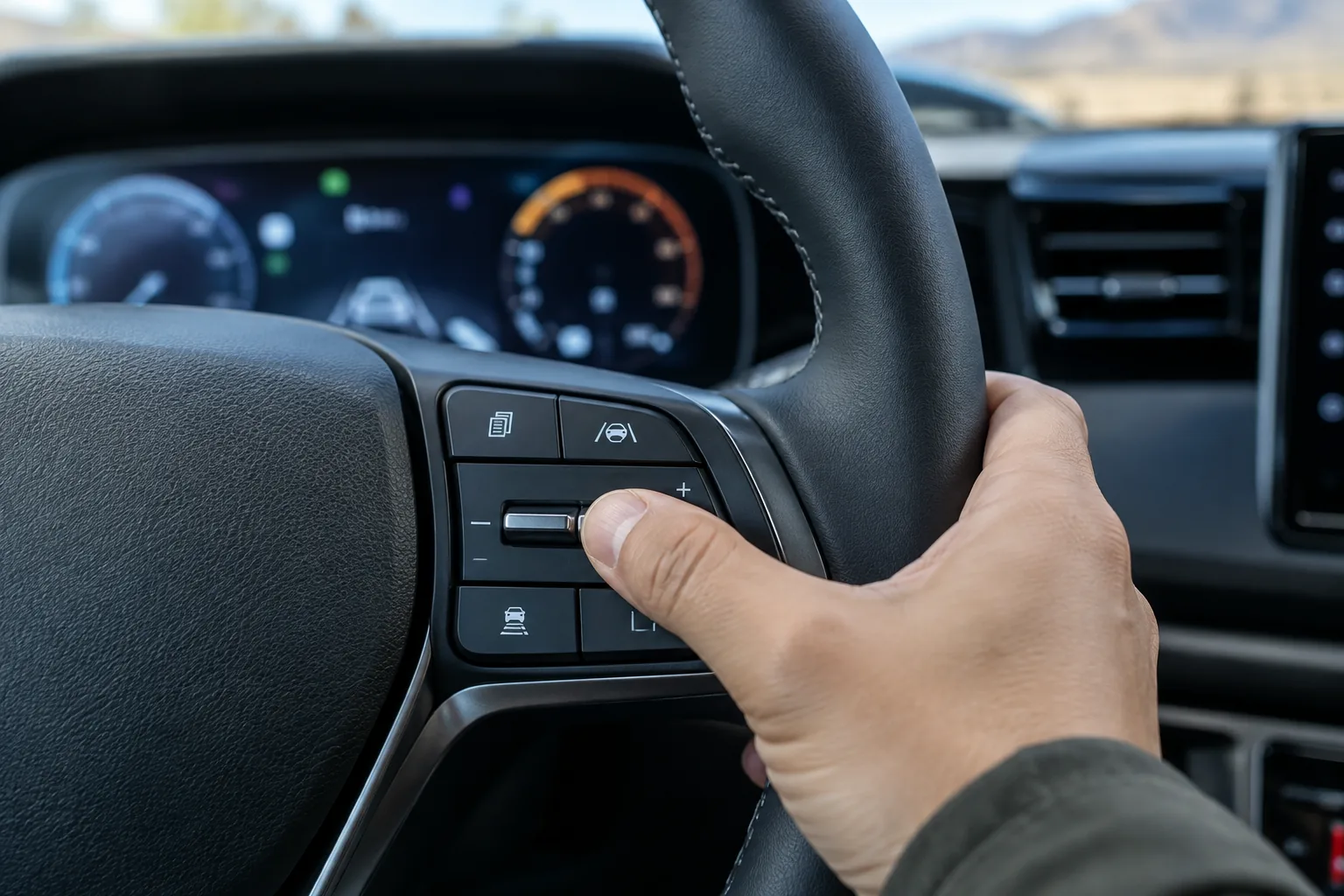
Hyundai hasn’t used one identical cluster across every Santa Cruz trim and year. Depending on trim, you may have a cluster with a smaller display between analog gauges or a larger fully digital one, and later model years may have changed menu layouts. I’m not going to invent exact button names or menu paths I can’t confirm. The steps below follow the logic that applies across them, and your manual’s instrument cluster or user settings section gives the exact labels.
Standard Method (Any Cluster)
- Park the truck on level ground, put it in Park, and set the parking brake.
- Turn the ignition to the ON position with the engine off. On push-button start, pressing the button without your foot on the brake normally does this, but confirm in your manual.
- Using the steering wheel controls (the arrow and OK or select buttons on the wheel), open the cluster’s settings or user settings menu.
- Scroll to the service interval item. The exact wording can differ, so check your manual for the menu name on your cluster.
- Select the reset option. If the menu lets you set the interval first, choose the mileage and time that match your manual’s schedule for your engine and driving conditions.
- Confirm when prompted, then back out of the menu.
Expected confirmation: the service message should disappear, and the display should show a fresh countdown when you next turn the ignition on. If the countdown still shows the old figure or the overdue message returns, the reset didn’t register.
If the Reset Fails
- No service interval item in the menu: The feature may be turned off, or your trim and year may place it somewhere else. Your manual’s cluster section will show where it lives.
- Menu won’t open or is greyed out: Many cluster menus are locked while the truck is moving or out of Park. Stop, shift to Park, and try again.
- Wrong message: Make sure it’s actually a maintenance reminder and not a warning light. A reset won’t clear a fault indicator.
- Still stuck: A Hyundai dealer can reset it and confirm the interval settings. Some owners choose to do this at the same visit as the service itself.
Doing the Oil Change Yourself
You don’t need a scan tool, app, or any purchase to reset this reminder. The steering wheel buttons are the whole tool.
If you’re handling the oil change yourself, the reset is the last step of the job. Our list of must-have DIY tools covers the basics. A low profile oil drain pan is a practical add-on if you’re working without ramps, since it fits under the truck more easily than a tall pan.

Low Profile Oil Drain Pan
Handy for catching oil cleanly when ground clearance is limited, and it has nothing to do with the reset itself.
Before you buy filters or oil, match them to your engine. The naturally aspirated and turbo 2.5L engines may not share the same parts or oil requirements, so confirm the oil grade, capacity, and filter fitment against your owner’s manual or the parts lookup for your exact VIN. If you’re comparing how other brands handle this, the Subaru Outback service due reset is a good example of a different system.
FAQ
Does resetting the reminder count as doing the maintenance?
No. The reset only restarts the countdown. Keep your receipts or a log of what was actually done, since that matters for your own records and for warranty questions.
Can I reset the reminder early?
You can, but you shouldn’t unless the service was done. An early reset pushes your next reminder further out than reality, and you could run well past the interval without a prompt.
The reminder came back right after I reset it. Why?
Most often the reset wasn’t confirmed, the menu was exited too early, or you’re looking at a different warning altogether. Repeat the steps in Park with the ignition on, and if it persists, ask a Hyundai dealer to check the interval settings. A red oil-pressure light or a check engine light should never be treated as a reminder problem.


Leave a Reply