

Setting the clock in your Ford F150 is required after disconnecting the battery. Following the instructions which suits your vehicle below, here are the easy steps to set the time on the clock.
2013 – 2023 Models
Option 1
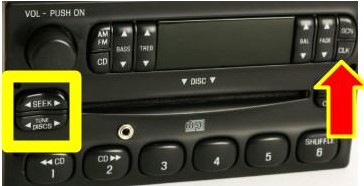
- Press and hold the CLK button until the hours begin to flash.
- Press the left or right Seek arrows to change the hours.
- Press the CLK button again to change to the minutes.
- Press the left or right Seek arrows to change the minutes.
- Allow 10 seconds to pass before releasing the CLK button and save the new time.
Option 2
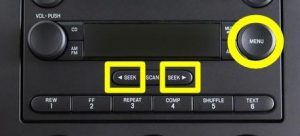
- Press the Clock button.
- Use the center arrow controls to change the time.
Option 3
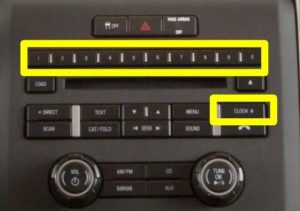
- Press Settings.
- Press Clock.
- Press the + or – to adjust the time.
*The correct time should now appear on your Home Screen. If so, you are all set. If you enter the wrong time, just press Clock again to start over. 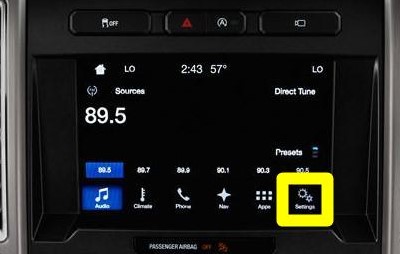
2009 – 2012 Models
- Press and hold the CLK button until the hours begin to flash.
- Press the left or right Seek arrows to change the hours.
- Press the CLK button again to change to the minutes.
- Press the left or right Seek arrows to change the minutes.
- Allow 10 seconds to pass before releasing the CLK button and save the new time.
OR
- Press the Clock button. “Set Time” will appear on the radio screen.
- Use the preset radio buttons to set the time.
2006 – 2008 Models
- Press and hold the CLK button until the hours begin to flash.
- Press the left or right Seek arrows to change the hours.
- Press the CLK button again to change to the minutes.
- Press the left or right Seek arrows to change the minutes.
- Allow 10 seconds to pass before releasing the CLK button and save the new time.
OR
- Turn the radio off.
- Press the Menu button. “Set Hours” will appear on the radio screen.
- Press the left or right Seek arrows to change the hours.
- Press the Menu button again until the screen says, “Set Minutes.”
- Press the left or right Seek arrows to change the minutes.
- Press the Menu button to exit.
1997 – 2005 Models
- Turn the key to the On position.
- Turn the radio off.
- Press and hold the CLK button.
- Use either the left or right Seek arrows to change the hours.
- Use the left or right Tune arrows to change the minutes.
1994 – 1996 Models
- Turn the key to the On position.
- Turn the radio on.
- Press and hold the Clock button to change the time.
- Press the left Seek arrow to change the hours.
- Press the right Seek arrow to change the minutes.
- Release the Clock button.
NOTE: If you are unable to set the Time on the first try, REPEAT the steps. If you are still unsuccessful, contact the dealership for assistance or consult your vehicle user’s manual.

Leave a Reply