
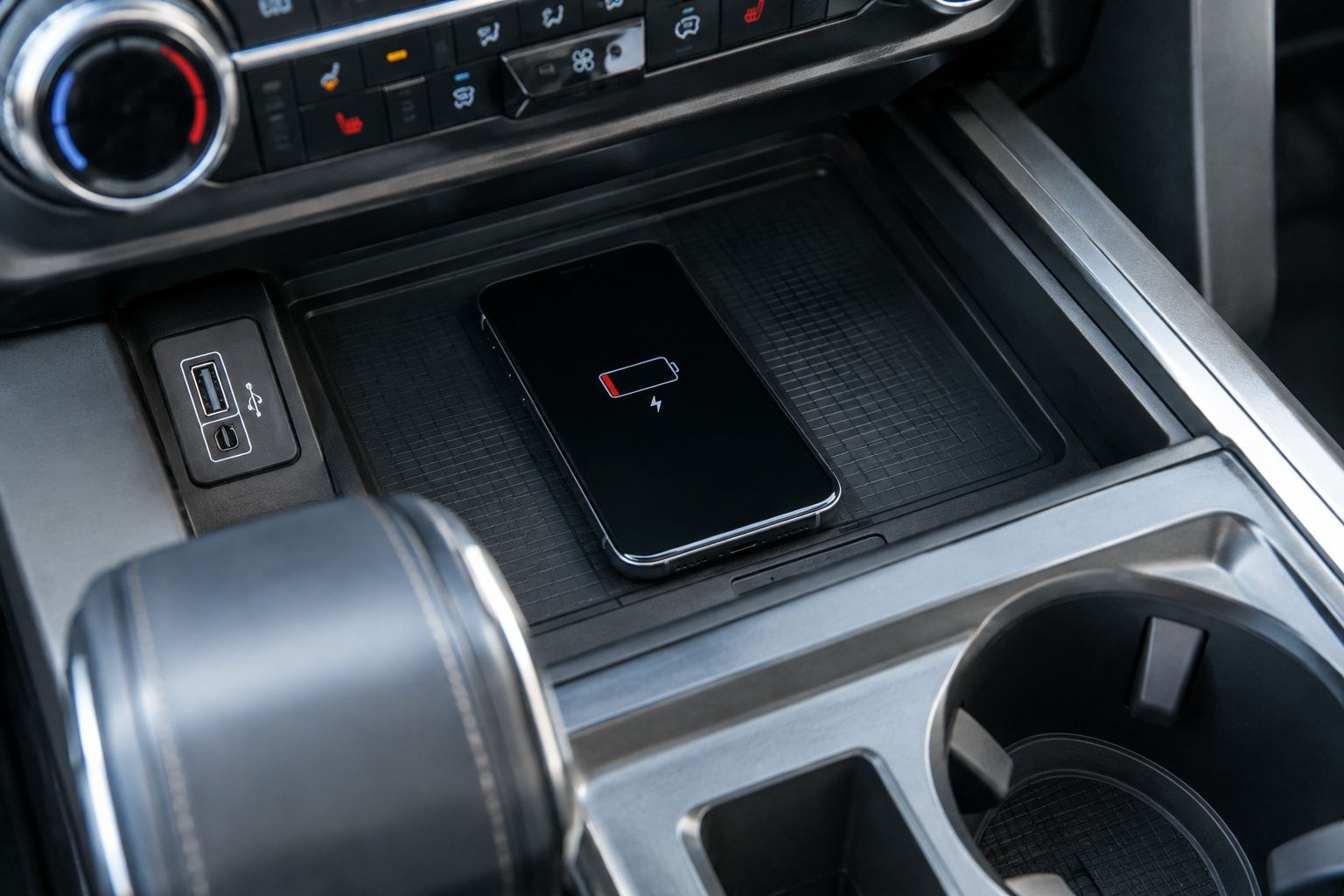
You set your phone on the charging pad, pull out of the driveway, and ten minutes later notice it’s still sitting at the same battery percentage or has dropped a few points instead of gaining any. A wireless charging pad that won’t charge, keeps disconnecting, or runs hot is one of the more common complaints F-150 owners bring up, and most of the time it comes down to something simple rather than a failed part.
Before you assume the pad itself is bad, it helps to walk through the same checks Ford techs use. Most fixes take less than five minutes.
Start With Compatibility and Placement
The factory wireless charging pad in the F-150 uses the Qi charging standard, and it’s typically located in a small tray ahead of the shifter or below the climate controls, depending on your trim and model year. Not every F-150 trim includes it as standard equipment, so double check that your truck actually has the feature before troubleshooting further, since some base XL and XLT configurations skip it entirely or offer it only as part of an options package.
Your phone also needs to support Qi wireless charging. Most iPhones from the iPhone 8 onward and most Android flagships from the last several years work fine, but budget phones and older models often don’t have a wireless coil at all. If you’re not sure, check your phone’s spec sheet before blaming the truck.
Placement matters more than people expect. The charging coil inside the pad is small, and if your phone sits even slightly off center, charging can be slow, intermittent, or stop completely. Ford’s pad usually has raised edges or a molded outline to help you center the phone, so use that as your guide every time instead of eyeballing it.
Cases, Metal, and Magnetic Accessories
Thick phone cases are one of the biggest causes of weak or failed wireless charging. Qi charging generally works through cases up to a few millimeters thick, but battery cases, wallet cases with card slots, and rugged outdoor cases often exceed that and block the connection entirely.
Metal is the other big culprit. Any metal plate, ring holder, kickstand, or credit card with a magnetic strip sitting between your phone and the pad can interfere with the charging coil or even generate heat as it reacts to the magnetic field. This is especially common with PopSockets that have metal backing plates or cases with built in kickstands.
If you use a MagSafe case or magnetic mount system, be aware that the factory pad in most F-150s isn’t a MagSafe charger, so the magnets won’t align the phone the way they would with a dedicated MagSafe accessory. Some owners have better luck removing the case completely for a quick test to confirm whether the case is actually the problem.
MagSafe Car Charger
A dedicated MagSafe mount snaps your phone into perfect alignment every time, which solves most of the placement issues that plague flat charging pads.
If your F-150 also has other tech quirks you’re working through, like the rear occupant alert or driver assist chimes, it’s worth checking out our guide on turning off the rear occupant alert on the Ford F-150 or turning off Driver Alert on the Ford F-150 while you’re in the settings menus anyway.
Heat, Debris, and Vehicle Power State
Wireless charging generates more heat than a wired connection, and the F-150’s pad includes thermal protection that will slow or pause charging if your phone gets too warm. This is normal behavior, not a malfunction. If you’re charging in direct summer sun through the windshield, expect the system to throttle back to protect the battery.
Debris in the tray, like coins, keys, or crumbs, can also block charging or scratch your phone’s back glass over time. Clean the tray out periodically and keep loose metal objects away from it.
Vehicle power state matters too. On some model years, the pad only charges when the truck is on or in accessory mode, and it may shut off a few minutes after you turn the truck off to save battery drain. If your phone stops charging the moment you park and walk away, that’s likely intentional, not a fault.
Software and Indicator Checks
The charging pad usually has a small indicator light near the tray that shows connection status. A blinking or amber light typically signals a problem with alignment, case interference, or overheating, while a solid light means it’s charging normally. Check your owner’s manual for the exact indicator behavior for your specific model year, since Ford has changed this across F-150 generations.
If the pad still won’t work after ruling out the phone, case, and placement, a SYNC software update can sometimes resolve charging glitches, since the infotainment system controls some of the charging pad’s logic. Check for updates through the SYNC menu or Ford’s website using your VIN.
When to Consider an Aftermarket Charger
If you’ve gone through every factory check and the pad still charges inconsistently, it may genuinely have failed, and replacement is a dealer service issue. In the meantime, or if you just want a more reliable daily setup, a wired car charger or an aftermarket magnetic mount charger is a solid fallback that won’t leave you guessing about alignment.
A simple USB-C fast car charger paired with a vent or dash mount gives you consistent charging speed regardless of case thickness or coil alignment, and it’s a cheap backup to keep in the glovebox.
FAQ
Why does my phone charge wirelessly at home but not in my F-150?
Home chargers often have stronger magnets or larger coils that forgive imperfect placement, while the factory pad in the truck requires more precise centering. A case that works fine at home may also be just thick enough to block the F-150’s lower powered pad.
Is it bad to leave my phone on the wireless pad all the time?
Occasional heat buildup during wireless charging isn’t harmful, but constant heat exposure over months can shorten battery lifespan faster than wired charging would. If you park in direct sun often, consider using a wired connection instead to reduce heat stress on the battery.

Leave a Reply