

A dash cam is one of the best investments you can make for your vehicle. It provides video evidence in accidents, captures insurance fraud attempts, and even records memorable road trips. With 4K resolution and advanced night vision becoming standard in 2026, the footage quality has never been better.
This guide compares the top five dash cams on the market right now, covering video quality, parking mode, ease of installation, and the features that actually matter for everyday driving.
What to Look for in a Dash Cam

Video resolution determines how clearly you can read license plates and see details in footage. At minimum, go with 1440p (2K). If your budget allows, 4K captures significantly more detail, especially at highway speeds where you only have a fraction of a second to capture a plate.
Night vision quality separates good dash cams from great ones. Look for models with large image sensors (like Sony STARVIS 2) that perform well in low light without excessive noise or washed-out footage. Test videos on YouTube are a great way to compare real-world night performance.
Parking mode monitors your car while it’s parked and starts recording when it detects motion or an impact. This feature requires either a hardwire kit (which taps into your car’s fuse box) or a dedicated battery pack to avoid draining your car battery.
Top 5 Dash Cams for 2026
Viofo A229 Pro (Best Overall)
The Viofo A229 Pro delivers true 4K front recording with a Sony STARVIS 2 sensor that excels in low light. It supports up to three channels (front, rear, and interior) for complete coverage. The built-in GPS logs your speed and location, which is useful for insurance claims.
Wi-Fi connectivity lets you download clips and adjust settings from your phone. The voice command feature makes it easy to save clips without taking your hands off the wheel.
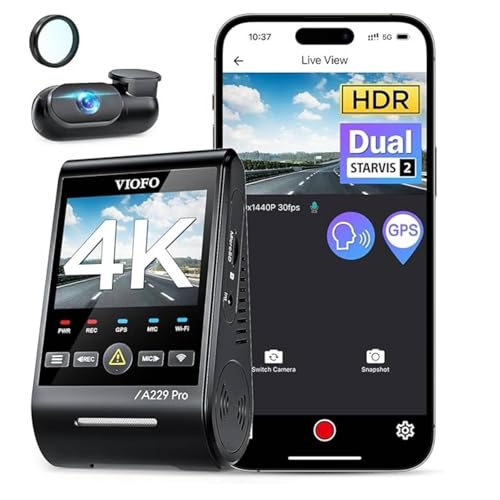
Viofo A229 Pro
Best overall choice with true 4K recording and exceptional night vision performance
Garmin Dash Cam 67W (Best for Wide Angle)
The Garmin Dash Cam 67W offers a 180-degree field of view that captures adjacent lanes and side streets that narrower cameras miss. It records in 1440p and includes Garmin’s cloud-connected features for remote access to saved footage.
The compact form factor is barely visible behind your rearview mirror. Voice control lets you command it to save video, take a photo, or start and stop recording.
Nextbase 622GW (Best Image Stabilization)
The Nextbase 622GW uses digital image stabilization to produce smooth footage even on rough roads. Its “what3words” crash location feature gives emergency services your exact position in the event of a serious accident.
4K recording, built-in Alexa, and a polarizing filter (included) to reduce windshield glare round out an impressive feature set.
Vantrue N4 (Best 3-Channel Budget Option)
The Vantrue N4 records front, inside, and rear simultaneously at a price point that undercuts most dual-channel competitors. The interior infrared camera captures clear footage even in complete darkness, making it ideal for rideshare drivers and fleet vehicles.
It supports up to 256GB microSD cards and includes 24-hour parking mode with a low-bitrate option to extend recording time.

Vantrue N4
Best value for three-channel recording with excellent night vision capabilities
Rexing V1 (Best Budget Pick)
The Rexing V1 proves you don’t need to spend a lot to get reliable dash cam footage. It records in 1080p with a wide-angle lens and handles loop recording and G-sensor event locking with zero fuss.
Installation takes about 5 minutes, and the discreet design hides neatly behind most rearview mirrors. For basic coverage on a budget, it’s hard to beat. This is a great option for first-time drivers who want basic protection without breaking the bank.
Installation Tips
Mount your dash cam as high on the windshield as possible, centered behind the rearview mirror. This position minimizes distraction and maximizes the camera’s field of view. Run the power cable along the headliner, down the A-pillar, and under the dashboard trim to the 12V outlet or a hardwire kit connection.
A hardwire kit provides cleaner installation than the included cigarette lighter adapter and enables parking mode without draining your main battery.
Legal Considerations
Dash cams are legal in all 50 U.S. states, but most states restrict windshield-mounted objects to certain areas. Generally, the camera must not obstruct your view. Some states require that cameras be mounted in the upper corner of the windshield or behind the rearview mirror.
Recording audio inside the vehicle may be subject to two-party consent laws in some states. If you drive for rideshare services, check your state’s recording consent laws and consider posting a small notice about in-vehicle recording.
Frequently Asked Questions
Do dash cams record when the car is off?
Only if they have parking mode and are connected via a hardwire kit or external battery pack. Without a constant power source, the camera shuts off when you turn off the ignition.
How much storage do I need for a dash cam?
A 128GB microSD card holds roughly 8 to 12 hours of 4K footage with loop recording. Most drivers find 128GB to be the sweet spot between capacity and cost.
Will a dash cam drain my car battery?
Good hardwire kits include a voltage cutoff that disables the camera before your battery drops too low. Set the cutoff to 12.0 volts to protect your battery while still getting several hours of parking mode coverage. This is particularly important if you’re storing your vehicle for an extended period.
Can dash cam footage be used in court?
Yes, dash cam footage is admissible as evidence in most jurisdictions. It’s frequently used in insurance disputes, traffic violations, and accident liability cases. Ensure your camera’s date and time stamps are accurate for the footage to be credible.
Leave a Reply