
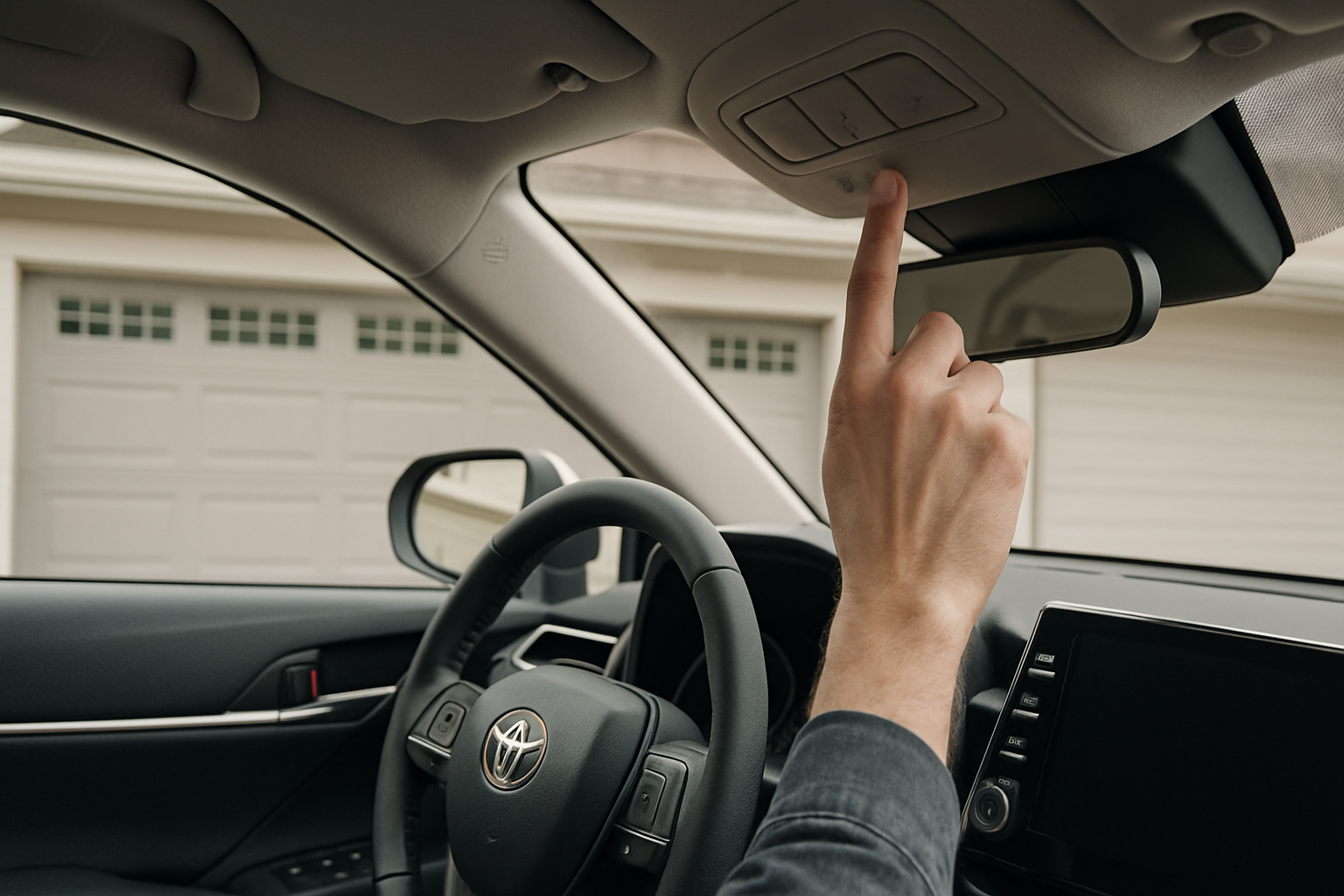
Setting up your Toyota Camry’s built-in garage door opener (HomeLink) means you can finally ditch those bulky remote controls cluttering up your visor or center console. This factory-installed system lets you program up to three different garage doors, gates, or other compatible devices directly into your car.
Toyota has included HomeLink in most Camry models since the early 2000s, though the location and programming process has changed slightly over the years. You’ll find the system either mounted in your rearview mirror or integrated into the overhead console, depending on your specific model year.
Understanding Your Camry’s HomeLink System
HomeLink is a universal remote control system that replaces up to three separate garage door or gate remotes. The system works with most garage door openers manufactured after 1995, including both rolling code and fixed code systems.
Your Camry’s HomeLink buttons are typically located in one of two places. In newer models (2018 and later), you’ll find three small buttons integrated into the rearview mirror assembly. Older Camrys often have the buttons mounted in the overhead console near the dome lights or in the driver’s side visor.
The beauty of HomeLink is that it learns the radio frequency and code from your existing remote, then stores that information permanently in the car’s memory. Once programmed, the buttons will retain their settings even if you disconnect the battery.
Rolling Code vs Fixed Code Garage Door Openers
Before you start programming, you need to identify what type of garage door opener you have. This determines which programming method you’ll use.
Fixed code systems use the same radio signal every time you press the remote. These older systems (typically pre-1995) are simpler to program and usually work with the basic HomeLink programming procedure.
Rolling code systems generate a different code each time you use the remote, which provides better security. Most garage door openers made after 1995 use rolling codes, including popular brands like Chamberlain, LiftMaster, Craftsman, and Genie.
You can usually identify a rolling code system by looking for a “learn” or “program” button on the garage door opener motor unit itself. If your opener has this button, you’ll need to use the rolling code programming method.
Basic Programming for Fixed Code Systems
Start with your Camry parked outside your garage with the engine running. Make sure your existing garage door remote has a fresh battery and works properly.
Press and hold the first and third HomeLink buttons simultaneously until the indicator light turns on (about 10 seconds). This clears any previous programming from all three buttons. The light will turn on and remain steady when the system is ready.
Hold your garage door remote about 1-3 inches away from the HomeLink buttons. Press and hold both your garage door remote button and the HomeLink button you want to program. Keep holding both buttons until the HomeLink indicator light changes from slow blinking to rapid blinking, then becomes solid.
Test the programmed button by pressing it. If your garage door responds, you’re done with that button. If not, you likely have a rolling code system and need to follow the additional steps below.
Programming Rolling Code Systems
Rolling code systems require an additional step to synchronize your car with the garage door opener. After completing the basic programming steps above, you’ll need to access the garage door opener motor unit itself.
Locate the “learn” or “program” button on your garage door opener motor (usually mounted on the ceiling of your garage). This button might be square, round, or rectangular and is often colored red, orange, purple, or black.
Press and release the learn button on the garage door opener. You typically have about 30 seconds to complete the next step, though this varies by manufacturer. Some units will turn on a small LED light to indicate they’re in learning mode.
Return to your Camry and press and hold the programmed HomeLink button for about 2 seconds, then release. Press and hold the same button again until the garage door begins to move. This synchronizes the rolling code between your car and the opener.
If your garage door doesn’t respond after several attempts, try holding the HomeLink button for different lengths of time. Some systems require you to press and release quickly, while others need a longer press.
Programming Additional Devices
You can program up to three different devices using the same basic process. Each HomeLink button operates independently, so you can mix and match garage doors, gates, and other compatible devices.
To program additional buttons without erasing your existing settings, skip the clearing step. Simply hold your remote close to the HomeLink buttons and simultaneously press the remote and the HomeLink button you want to program.
Keep in mind that each button can only control one device. If you have multiple garage doors, you’ll need to use a separate button for each one.
Troubleshooting Common Programming Issues
If your HomeLink isn’t programming correctly, start by checking the battery in your original remote. Weak batteries often cause programming failures even when the remote still works for normal operation.
Distance matters during programming. Hold your remote 1-3 inches from the HomeLink buttons. Too close or too far can prevent proper signal transmission. Try adjusting the distance and angle if you’re having trouble.
Some garage door openers have multiple learn buttons or switches. If you have a newer opener with multiple colored buttons, consult your garage door opener manual to determine which button controls HomeLink programming.
Interference from other devices can also cause problems. Turn off LED lights, cell phones, and other electronics near your garage during programming. Some LED bulbs can interfere with the radio frequencies used by garage door openers.
Mirror-Mounted vs Visor-Mounted Systems
The location of your HomeLink buttons affects how you’ll interact with the system daily. Mirror-mounted systems are more convenient since they’re always visible and accessible, regardless of visor position.
Visor-mounted HomeLink systems work identically but require you to position the visor correctly for easy access. Some drivers find these less convenient, especially if they frequently adjust their visors for sun protection.
Programming procedures are identical regardless of location. The only difference is the physical positioning of the buttons themselves.
Special Considerations for Specific Garage Door Brands
Chamberlain and LiftMaster openers often require you to hold the HomeLink button until the garage door moves completely through one cycle. Don’t release the button when the door starts moving.
Genie rolling code systems sometimes require multiple programming attempts. If the first attempt doesn’t work, repeat the rolling code programming process 2-3 times.
Craftsman openers (made by Chamberlain) typically use the same programming method as Chamberlain units. Look for the purple, orange, or red learn button on the motor unit.
Erasing and Reprogramming Buttons
To erase a single button, press and hold that button until the indicator light begins to blink slowly (about 10 seconds), then release. This clears only that button while leaving the others programmed.
To erase all three buttons, press and hold the first and third buttons simultaneously until the light turns on, just like when you first programmed the system.
You might need to reprogram if you replace your garage door opener or if the system stops working properly. Always start fresh by erasing the button before reprogramming.
Testing Your Programming
After programming each button, test it several times to ensure reliable operation. Press the HomeLink button from various distances to confirm it works from your normal parking position.
Test the system with your car both running and off. Some older HomeLink systems only work with the ignition on, while newer systems work anytime.
Make sure the programmed button doesn’t interfere with other garage door openers in your neighborhood. If your button opens a neighbor’s garage, you’ll need to reprogram using a different remote frequency.
Frequently Asked Questions
Will HomeLink work with my older garage door opener?
HomeLink works with most garage door openers manufactured after 1982. However, some very old systems may not be compatible. If your opener is from the early 1980s or uses an unusual frequency, you might need a universal adapter module.
What happens if I sell my Camry?
The new owner can reprogram the HomeLink buttons for their own garage doors. Simply clearing and reprogramming erases your settings completely. You don’t need to worry about security issues when selling your car.
Can I program other devices besides garage doors?
Yes, HomeLink works with many gate operators, home lighting systems, and other devices that use compatible radio frequencies. Check the device manufacturer’s specifications to confirm HomeLink compatibility.
Why does my programmed button work sometimes but not others?
Inconsistent operation usually indicates a weak signal or interference. Check for LED lights, wireless devices, or other electronics that might interfere with the radio signal. You might also need to reprogram the system if the connection has weakened over time.
This article contains affiliate links. If you purchase through these links, we may earn a small commission at no extra cost to you.
Leave a Reply