

Ford’s integration with Amazon Alexa transforms your daily commute into a connected experience that extends far beyond basic voice commands. With SYNC 4 technology, you can control your smart home, stream music, get directions, and access thousands of Alexa skills without ever taking your hands off the wheel.
This feature works in Ford vehicles equipped with SYNC 4, which includes most 2020 and newer models across the Ford lineup. You’ll find it in everything from the F-150 and Escape to the Mustang Mach-E and Bronco.
Understanding Ford’s Alexa Built-In Technology
Ford’s Alexa Built-In isn’t just another voice assistant. It’s a full integration that connects directly to your Amazon account and accesses the same features you’d find on an Echo device at home.
Unlike smartphone-based solutions that require you to open an app or connect via Bluetooth, Alexa Built-In uses your vehicle’s built-in cellular connection. This means you can access Alexa even if your phone is dead or you’ve left it at home.
The system works through Ford’s SYNC 4 infotainment platform, which features the hardware and processing power needed to run Alexa’s voice recognition and response systems locally in your vehicle.
What You’ll Need Before Getting Started
Setting up Alexa requires a few things to be in place first. You’ll need an active Amazon account, which is free to create if you don’t already have one.
Your Ford vehicle needs an active FordPass Connect subscription for the cellular data connection. Most new Ford vehicles include a complimentary period, typically three to five years depending on the model year.
You’ll also want to download the FordPass app on your smartphone, as this simplifies the setup process considerably. The app is available for both iOS and Android devices.
Linking Your Amazon Account to Ford SYNC
Start by ensuring your vehicle is parked and the engine is running or in accessory mode. The setup process takes several minutes, and you don’t want the system shutting down halfway through.
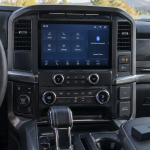
On your SYNC 4 touchscreen, navigate to the Settings menu by pressing the gear icon on the home screen. Look for “Voice Control” or “Amazon Alexa” in the settings menu. The exact location varies slightly between model years.
Select “Set Up Amazon Alexa” when you find the option. The system will display a QR code on the screen along with a web address and setup code.
Using Your Smartphone for Quick Setup
The fastest way to complete setup is using your phone’s camera to scan the QR code. This opens your phone’s browser and takes you directly to Amazon’s vehicle setup page.
Log into your Amazon account when prompted. Amazon will ask you to confirm that you want to link this Ford vehicle to your account. Accept the permissions, and Amazon will send the connection details back to your vehicle.
You’ll see a confirmation message on your SYNC screen when the linking process completes successfully. This usually takes 30 to 60 seconds after you complete the steps on your phone.
Manual Setup Without QR Code
If you prefer not to use the QR code or your phone’s camera isn’t working properly, you can complete setup manually. Write down the web address and setup code shown on your SYNC screen.
Using any internet-connected device, go to the web address displayed on your screen. Enter the setup code when prompted, then log into your Amazon account.
Follow the same permission and confirmation steps as the QR code method. The connection process works identically regardless of which setup method you choose.
Activating Alexa with Voice Commands
Once setup is complete, you can activate Alexa using the wake word “Alexa” just like you would with an Echo device. Speak clearly and wait for the blue ring to appear on your SYNC screen before continuing with your request.
You can also press and hold the voice button on your steering wheel, then say “Alexa” followed by your command. This method works well in noisy driving conditions where the wake word might not register consistently.
The system responds with Alexa’s familiar voice, and you’ll see visual feedback on the SYNC screen for many requests. Music controls, smart home device status, and weather information display on the screen while Alexa speaks.
Smart Home Control From Your Vehicle
One of Alexa’s most practical in-vehicle features is smart home control. You can turn lights on or off, adjust thermostats, lock doors, and control any Alexa-compatible smart home devices.
Try commands like “Alexa, turn on the living room lights” or “Alexa, set the thermostat to 72 degrees.” These work exactly as they would at home, letting you prepare your house before you arrive.
Smart garage door openers are particularly useful for this application. You can open your garage door as you pull into the driveway without needing to find your remote or use a smartphone app.
Security systems, smart locks, and even robot vacuums respond to voice commands through your Ford’s Alexa integration. The key is ensuring all your smart home devices are already set up and working in your regular Alexa app.
Music and Entertainment Options
Alexa Built-In gives you access to Amazon Music, Spotify, Pandora, iHeartRadio, and other supported streaming services. You’ll need active subscriptions to premium services like Spotify Premium or Amazon Music Unlimited for full functionality.
Voice commands like “Alexa, play classic rock” or “Alexa, play my driving playlist” work seamlessly. You can also request specific artists, albums, or songs depending on your streaming service’s catalog.
Podcast and audiobook support works through Amazon’s ecosystem. If you have Audible books or Amazon Music podcast subscriptions, you can access them through voice commands in your vehicle.
The audio plays through your vehicle’s sound system with full steering wheel and touchscreen control integration. You can skip tracks, adjust volume, and pause playback using your normal vehicle controls.
Navigation and Traffic Information
While Ford vehicles have built-in navigation systems, Alexa can provide additional traffic information and alternative routing suggestions. Ask “Alexa, how’s traffic to work?” or “Alexa, what’s the fastest route to the airport?”
Alexa integrates with your Amazon account’s saved locations, so requests like “Alexa, navigate home” work automatically if you’ve set up your home address in the Alexa app.
For complex addresses or business names, Alexa’s voice recognition often works better than typing on the touchscreen while parked. Say “Alexa, navigate to 123 Main Street, Springfield” and let the system find and load the destination.
Traffic updates and estimated arrival times are spoken aloud and can display on your SYNC screen. This information supplements your vehicle’s built-in navigation system rather than replacing it.
Additional Alexa Skills and Features
Your Ford’s Alexa integration supports thousands of third-party skills, just like home Echo devices. You can check bank account balances, order food for pickup, get news briefings, and access weather forecasts.
Shopping features work particularly well for quick additions to your Amazon cart. Say “Alexa, add milk to my shopping list” or “Alexa, reorder my usual coffee” during your commute.
Sports scores, stock prices, unit conversions, and general knowledge questions all work through voice commands. These features make your Ford vehicle feel like an extension of your connected home environment.
Calendar integration lets you check appointments and add reminders. If your Amazon account connects to Google Calendar or Outlook, you can ask about upcoming meetings or schedule follow-up tasks.
Troubleshooting Common Setup Issues
If the QR code isn’t displaying properly on your SYNC screen, try restarting the infotainment system by holding the power and skip forward buttons simultaneously for about 10 seconds. This forces a system reset without affecting other vehicle settings.
Connection timeouts during setup usually indicate cellular signal issues. Try moving your vehicle to a different location with better reception, or wait and attempt setup later when network traffic might be lighter.
Voice recognition problems often improve after the system learns your speech patterns. Speak clearly and at normal volume, avoiding shouting or whispering. The microphones are designed to pick up normal conversation levels.
If Alexa stops responding after successful setup, check your FordPass Connect subscription status. Expired data plans prevent the system from reaching Amazon’s servers, even though other SYNC features continue working.
Privacy and Data Considerations
Ford’s Alexa integration uses the same privacy settings as your regular Amazon account. You can review and delete voice recordings through the Alexa app or Amazon’s website.
The system only listens actively after hearing the wake word or pressing the voice button. However, like all voice assistants, it continuously monitors for the wake word activation.
Location data gets shared with Amazon to provide relevant responses for weather, traffic, and local business information. You can adjust these permissions through your Amazon privacy settings.
Guest drivers using your vehicle will access your Alexa account and connected services. Consider this when lending your car or taking it for service appointments.
Frequently Asked Questions
Does Alexa Built-In work without an internet connection?
No, Alexa requires an active cellular data connection through FordPass Connect. Without internet access, voice commands won’t reach Amazon’s servers for processing. Your vehicle’s built-in voice commands for climate control and radio still work offline.
Can I use multiple Amazon accounts with one vehicle?
Ford’s system links to one Amazon account at a time. To switch accounts, you’ll need to go through the setup process again and unlink the previous account. This makes the feature less convenient for families with separate Amazon accounts.
Will Alexa Built-In drain my vehicle’s battery?
The system goes into sleep mode when you turn off the vehicle, using minimal power to maintain the connection. Battery drain is comparable to other connected features like remote start capability. If you’re storing the vehicle for extended periods, consider disconnecting the 12-volt battery.
What happens when my FordPass Connect subscription expires?
Alexa Built-In stops working when your cellular data subscription ends. Ford typically offers renewal options through the FordPass app or dealership service departments. Renewal costs vary by model year and data package options.


Leave a Reply