

BMW’s Auto Start Stop function automatically shuts off the engine at red lights and restarts it when you lift your foot off the brake pedal. While designed to improve fuel economy, many BMW X3 owners find this feature intrusive, especially during stop-and-go traffic or quick errands around town.
The Bottom Line
A plug-and-play module can make your BMW X3 remember your preference to keep Auto Start/Stop off, so you don’t have to press the button every time you start the vehicle.
What Auto Start Stop Does on Your BMW X3
The Auto Start Stop system in your 2018-2026 BMW X3 monitors various conditions like engine temperature, battery charge, air conditioning load, and brake pressure. When you come to a complete stop and hold the brake pedal, the system shuts down the engine after a brief moment.
The engine automatically restarts as soon as you release brake pressure or touch the accelerator. While BMW claims this saves fuel during city driving, the constant engine cycling creates vibration, delays acceleration, and can feel jerky during normal driving situations.
Many X3 owners report the system feels particularly intrusive during drive-through lines, parking maneuvers, or heavy traffic where you’re frequently stopping and starting. The brief delay between releasing the brake and engine restart can also feel sluggish compared to a continuously running engine.
The Temporary Fix: Dashboard Button Method
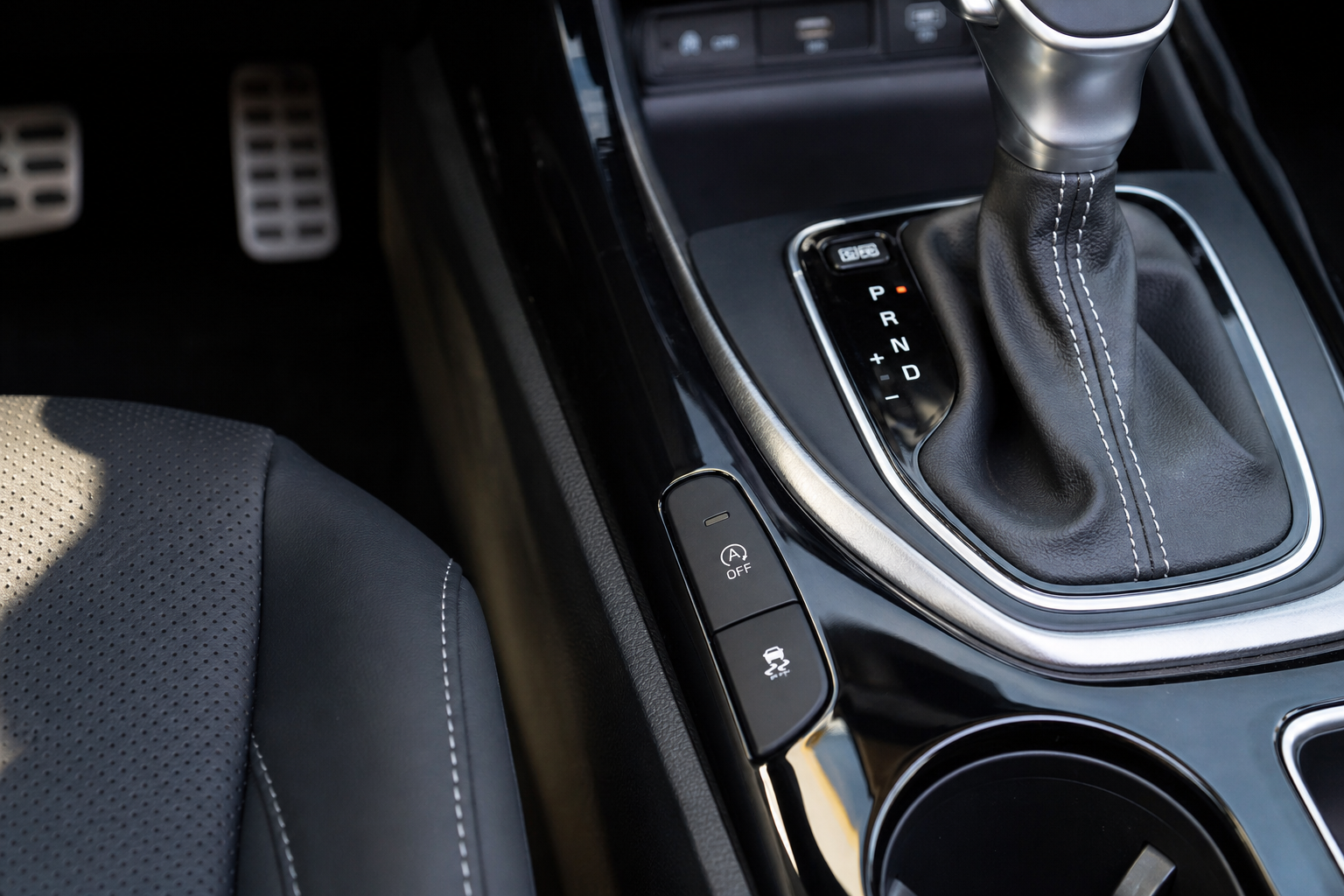
Your BMW X3 includes a manual override button that temporarily disables Auto Start Stop for your current driving session. You’ll find this button on the center console, typically located near the parking brake or drive mode selector.
The button displays a circular arrow icon with an “A” inside it, often with the text “AUTO” or “START STOP” nearby. Press this button once to deactivate the system. The button will illuminate when the feature is turned off, and you’ll see a message in your instrument cluster confirming the change.
This method works perfectly for temporary relief from the Auto Start Stop function. Your engine will stay running at stops until you manually reactivate the system or restart your vehicle.
Why the Temporary Fix Gets Frustrating
The major drawback of using the dashboard button is that BMW resets the Auto Start Stop system to “active” every time you turn off your X3. This means you’ll need to press the deactivation button during every single drive if you want to avoid the start/stop cycling.
For daily drivers who consistently dislike this feature, remembering to disable it each time becomes a routine annoyance. You might forget to press the button and experience unwanted engine shutdowns during your commute, or you might find yourself automatically reaching for the button every time you start the car.
BMW designed this reset behavior intentionally to ensure maximum fuel economy benefits, but it creates frustration for owners who prefer conventional engine operation.
Permanent Solutions for BMW X3 Auto Start Stop
Several aftermarket options can permanently disable Auto Start Stop on your BMW X3 without affecting other vehicle systems. These solutions fall into two main categories: plug-and-play eliminator devices and software coding modifications.
Plug-and-Play Eliminator Devices
Auto Start Stop eliminator devices are small modules that intercept signals between your car’s sensors and the engine control unit. These devices trick the system into thinking conditions aren’t suitable for auto stop, keeping your engine running continuously.
You can find two types of eliminators for the BMW X3. OBD2 port eliminators plug directly into your diagnostic port, usually located under the dashboard near your left knee. Installation takes about 30 seconds and requires no tools or technical knowledge.
Behind-switch eliminators connect directly to the wiring harness behind your dashboard Auto Start Stop button. These require more installation time and basic wire connection skills, but they’re completely hidden once installed and don’t occupy your OBD2 port.
Software Coding Solutions
BMW X3 models from 2018-2026 can be recoded using diagnostic software to permanently disable Auto Start Stop. The BimmerCode app, combined with a compatible OBD2 adapter, allows you to modify this setting directly in your vehicle’s control modules.
Other coding options include ISTA+ (BMW’s official diagnostic software), E-Sys, and various third-party BMW coding applications. These methods require an OBD2 interface cable, laptop or smartphone, and some technical comfort level with automotive software.
Software coding provides the cleanest solution since it modifies the factory setting rather than fooling sensors. However, these changes may be detected during dealer service visits and could potentially affect warranty coverage.
Recommended Auto Start Stop Eliminator Devices
Several manufacturers produce reliable auto start stop eliminator devices for BMW X3 models. These plug-and-play solutions offer the easiest installation method for most owners.
Start/Stop eliminators designed specifically for BMW vehicles typically connect through the OBD2 diagnostic port or splice into the button wiring harness. Many of these devices include vehicle-specific programming to ensure compatibility with your X3’s electrical systems.
Popular brands include Autostop Eliminator, Start-X, and various BMW-specific modules available through automotive electronics suppliers. When selecting a device, verify compatibility with your specific model year and engine configuration.
Installation Overview for OBD2 Eliminators
Installing an OBD2-based Auto Start Stop eliminator on your BMW X3 requires minimal time and no technical expertise. The diagnostic port is located under the dashboard on the driver’s side, typically near the fuse box or left of the steering column.
Turn off your vehicle completely and remove the key or push-button fob from the cabin. Locate the rectangular OBD2 connector and firmly insert the eliminator device until it clicks into place.
Start your BMW X3 and verify the eliminator is functioning by coming to a complete stop with your foot on the brake pedal. Your engine should continue running instead of shutting down automatically.
Most quality eliminators include LED indicators that confirm proper installation and operation. Some devices also retain the ability to manually activate Auto Start Stop using the dashboard button when desired.
BimmerCode Software Solution
BimmerCode offers one of the most popular software methods for permanently coding out Auto Start Stop on BMW X3 models. This smartphone app works with compatible OBD2 adapters to access your vehicle’s coding parameters.
You’ll need to purchase the BimmerCode app (available for iOS and Android) and a compatible wireless OBD2 adapter. Popular choices include adapters from Veepeak, OBDLink, and BIMMERCODE’s recommended hardware list.
Connect the OBD2 adapter, launch the BimmerCode app, and navigate to the comfort settings section. Look for the Auto Start Stop function and change the setting from “active” to “not active” or “disabled.”
The coding process takes about 10-15 minutes and permanently modifies your vehicle’s software. Your Auto Start Stop system will remain disabled until you reverse the coding change through the same app.
Things to Consider Before Disabling
Permanently disabling Auto Start Stop may have implications for warranty coverage, emissions compliance, and resale value. While the system doesn’t affect engine reliability or safety, some dealers might question modifications discovered during service visits.
The Auto Start Stop function contributes to your BMW X3’s official EPA fuel economy ratings. Disabling this system will likely reduce your real-world fuel efficiency, particularly during city driving with frequent stops.
Most aftermarket eliminators and coding changes are reversible if you need to restore original functionality. Keep installation instructions and software tools available in case you want to revert the modification.
Consider your local emissions testing requirements as well. Some regions include Auto Start Stop functionality in their vehicle inspection criteria, though this is currently rare in most areas.
Frequently Asked Questions
Will disabling Auto Start Stop void my BMW warranty?
Using plug-and-play eliminator devices typically won’t void your warranty since they don’t modify factory wiring or software. However, BMW dealers might temporarily remove the device during service visits. Software coding modifications have slightly higher warranty risk, though proving the connection between coding changes and unrelated warranty claims can be difficult for dealers.
Can I still use the dashboard button after installing an eliminator?
This depends on the specific eliminator device you choose. Some models completely override the Auto Start Stop system and disable the dashboard button functionality. Others maintain manual control, allowing you to reactivate the feature temporarily when desired. Check product specifications before purchasing.
How much fuel economy will I lose by disabling this feature?
Most BMW X3 owners report a 1-3 mpg decrease in city driving after disabling Auto Start Stop. Highway fuel economy typically remains unchanged since the system doesn’t activate during continuous driving. Your individual results will vary based on driving patterns, traffic conditions, and local terrain.
Is the BimmerCode method better than plug-and-play devices?
BimmerCode provides a cleaner software solution that doesn’t require any hardware installation or OBD2 port occupation. However, it requires more technical comfort and carries slightly higher warranty considerations. Plug-and-play devices offer simpler installation and easier reversibility but occupy your diagnostic port permanently.
This article contains affiliate links. If you purchase through these links, we may earn a small commission at no extra cost to you.


Leave a Reply