
You climb into your Kia Telluride after dropping the kids off, and that “Rear Occupant Alert” message pops up on your cluster again, even though you already checked the back seat twice. It’s one of those safety features that works great until it doesn’t quite match your routine, and then it starts to feel more like a nag than a helpful reminder. The good news is that Kia gives you a few ways to manage it, and once you know where to look, adjusting it takes less than a minute.
This guide walks through exactly what triggers the alert, where to find the settings, what the difference is between the visual and audible warnings, and why the system sometimes fires off even when you’re sure the back seat is empty.
What the Rear Occupant Alert Actually Does
The Rear Occupant Alert (Kia often shortens it to ROA in owner materials) is designed to remind you to check the back seat before you walk away from the vehicle. It’s part of a broader industry push to cut down on hot car deaths, and Kia has built it into nearly every Telluride trim since the model launched for the 2020 model year.
The system uses an ultrasonic sensor mounted in the headliner, usually near the dome light, to detect motion in the rear seats after you’ve parked and turned off the engine. It’s not a weight sensor and it’s not tied to the seatbelt buckles. It’s purely motion-based, which matters a lot for understanding why it behaves the way it does.
There are actually two separate layers to how this feature works on the Telluride, and Kia treats them differently in the settings menu.
The Basic Reminder
The first layer is a simple reminder that triggers any time you open one of the rear doors before or during your trip, whether or not anyone is actually sitting back there. This is the version most Telluride owners see the most often, since it fires just from opening a rear door to toss in a grocery bag or a diaper bag.
When you shut off the car and open the driver’s door, you’ll get a chime and a message on the cluster or infotainment screen saying something like “Rear occupant alert, check rear seats.” This layer cannot be permanently disabled on most model years because Kia and other automakers ties it to federal guidance around child safety awareness.
The Ultrasonic Motion Detection Layer
The second layer is the more advanced one. If the ultrasonic sensor detects movement in the rear seats after you’ve left the vehicle and locked it, the Telluride will honk the horn repeatedly and send a push notification to your phone through the Kia Access or Kia Connect app (the app name changed depending on model year).
This is the layer most owners are actually trying to adjust, since it can occasionally trigger from a rear passenger’s pet, a bag that shifts, or even a strong gust of wind rocking the vehicle slightly. Unlike the basic door-open reminder, this motion detection alert does have adjustable sensitivity and can be turned off in the settings menu on most trims.
Where to Find the Setting on the Telluride
Kia has moved this menu around slightly between model years, so the exact wording depends on when your Telluride was built. Here’s the general path that works for 2020 through 2024 model years.
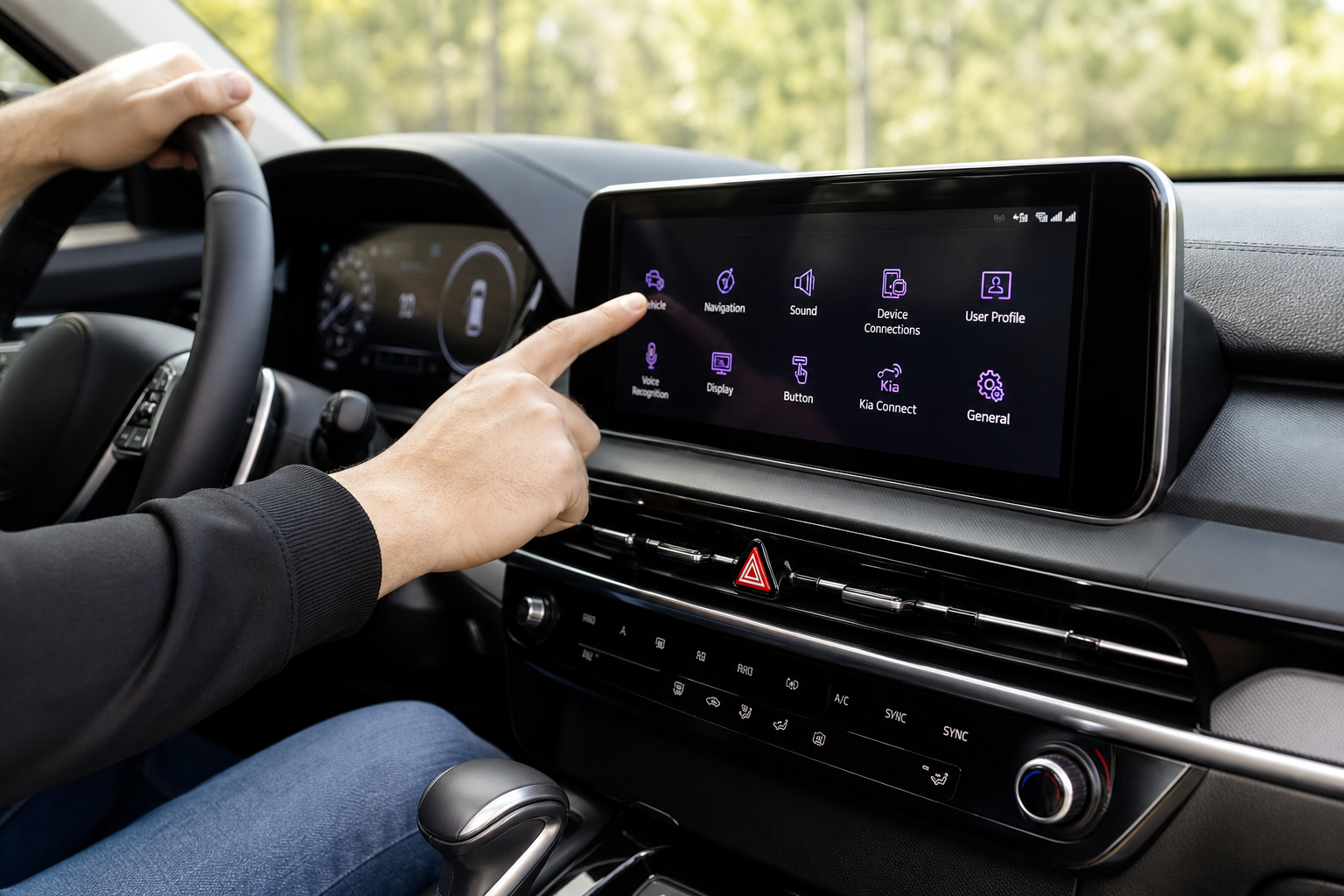
- Press the settings (gear icon) button on your touchscreen.
- Select “Vehicle” or “Vehicle Settings” from the menu.
- Scroll to “Convenience” or “Convenience/Safety.”
- Look for “Rear Occupant Alert” or “Ultrasonic Rear Occupant Alert.”
- Toggle the ultrasonic detection portion off, or adjust it to a lower sensitivity if that option is available on your trim.
On newer Tellurides with the larger 12.3 inch curved display (2023 and later), the menu is labeled “Rear Occupant Alert” under the Convenience tab, and Kia separates the “Alert Notification” toggle from the “Sensitivity” slider. Earlier model years with the smaller 10.25 inch screen sometimes list it simply as “Rear Occupant Alert” with a single on/off switch, no sensitivity adjustment.
If you can’t find it under Vehicle Settings, check under “Safety” instead. Kia has shuffled this menu category more than once across software updates, and a dealer-installed infotainment update can move it without much notice.
Visual vs. Audible Warnings: What You Can Turn Off Separately
One thing that confuses a lot of Telluride owners is assuming there’s a single on/off switch for the whole feature. There isn’t. Kia splits the warnings into layers, and you have different levels of control over each one.
- The in-car chime and dash message that appears when you open a rear door during your trip cannot be turned off. This is the basic reminder layer and it’s baked into the vehicle’s core safety programming.
- The exterior horn honk that happens after you’ve walked away from a locked vehicle with motion detected in back can be disabled through the ultrasonic toggle described above.
- The phone push notification through the Kia Connect app is tied to the same ultrasonic sensor, so turning off the horn alert also stops the app notification in most cases. On some model years you can manage app notifications separately inside the Kia Connect app settings without touching the vehicle’s onboard menu at all.
If you want the safety benefit without the occasional false alarm honking in a parking lot, try lowering the sensitivity instead of turning it off completely. Not every trim offers this middle ground, but it’s worth checking before you disable the feature outright.
Does the Setting Stick After You Restart the Car?
This is where things get a little inconsistent depending on your model year and software version. On most 2022 and newer Tellurides, the ultrasonic alert toggle is a persistent setting. Once you turn it off, it stays off through key cycles, cold starts, and even after the battery has been disconnected for maintenance.
Earlier 2020 and 2021 model years running older infotainment software have been reported by some owners to reset the toggle back to “on” after certain software updates or after a battery disconnect for service work. If you’ve turned the feature off and it’s mysteriously back on after a dealer visit, that’s the likely explanation. It’s not a bug so much as the update reinstalling default settings.
The basic door-open reminder, the one you can’t turn off, obviously persists every single time regardless of software version, since there’s no toggle to reset in the first place.
Why It Still Alerts Even After You’ve Already Checked the Back Seat
Here’s the scenario that trips people up the most. You open a rear door early in your drive, maybe to grab a jacket or let a kid climb in, and even though everyone is out of the car by the time you park, the Telluride still gives you the rear occupant reminder when you shut off the engine.
This happens because the system doesn’t actually know the back seat is empty. It only knows that a rear door was opened at some point during the ignition cycle. Kia’s logic assumes that if a door back there was opened, there’s a reasonable chance someone or something was placed in that seat, so it defaults to reminding you regardless of what actually happened.
This is intentional, not a glitch. The alternative would require Kia to build in occupancy sensors on par with the front seat weight sensors used for airbag deployment, which would add cost and complexity for what’s ultimately meant to be a simple reminder system. The current version errs on the side of over-alerting rather than risk missing a real occupant.
If this bothers you, the honest fix is just to get in the habit of glancing back before you close the driver’s door, then dismissing the alert on the touchscreen once you’ve confirmed the seat is clear. It takes about two seconds and it’s a lot faster than digging through settings every time.
How This Compares to Other Automakers
Kia’s approach here is very similar to what Hyundai does across its own lineup, which makes sense since the two brands share a parent company and a lot of underlying tech. If you’re curious how Hyundai’s version compares, or if you own both a Kia and a Hyundai in your household, our guide on the Rear Seat Reminder and Rear Occupant Alert on Hyundai vehicles covers the same basic system with Hyundai’s slightly different menu wording.
Most competitors, including GM, Honda, and Toyota, use a simpler version that relies only on the door-open logic without the added ultrasonic motion detection layer. Kia and Hyundai are among the few brands offering the more advanced honk-and-notify system as standard equipment on family focused models like the Telluride, which is a genuine advantage if you’re the type of driver who wants extra backup beyond just remembering on your own.
A Few Related Telluride Settings Worth Knowing
While you’re in the Vehicle Settings menu adjusting the Rear Occupant Alert, it’s a good time to check a few other convenience features that live in the same general area. The Telluride’s climate controls, for example, include ventilated and heated seats that a lot of owners never fully set up beyond the default settings. Our guide on using the ventilated and heated seats on the Kia Telluride walks through the memory presets and auto-activation options that pair nicely with the same climate menu.
If you’re dealing with any dashboard warning lights around the same time you’re adjusting these settings, it’s worth ruling out unrelated issues before assuming they’re connected. A recent recall roundup covering Kia and other automakers is a good reminder to keep an eye on any official service bulletins tied to your specific VIN.
Frequently Asked Questions
Can I completely turn off the Rear Occupant Alert on my Kia Telluride?
You can turn off the ultrasonic motion detection layer, which stops the exterior horn honking and phone notifications after you’ve parked. You cannot turn off the basic in-car reminder chime that appears when you open a rear door during your drive, since that portion is not adjustable on any current model year.
Why does my Telluride honk the horn after I’ve already gotten out?
That’s the ultrasonic sensor detecting motion in the back seat after the vehicle is locked. It could be a real occupant, a pet, a bag shifting, or even the car rocking slightly in strong wind. If it happens frequently in situations where you know the back seat is empty, try lowering the sensitivity or turning the feature off in the settings menu.
Does turning off the alert affect my Kia Connect app notifications?
In most cases yes, since the app notification and the exterior horn honk both rely on the same ultrasonic sensor data. Some model years let you manage the app notifications separately inside the Kia Connect app itself, so check there if you want to keep the phone alert while disabling the horn.
Will my settings reset if I get my Telluride serviced?
It’s possible, especially on 2020 and 2021 model years running older software. A battery disconnect or an infotainment software update at the dealership can occasionally reset the toggle back to its default “on” position. It’s a good habit to check the setting after any major service visit just to be safe.
Leave a Reply